本文档介绍 VLink 的节点发现机制,包括 DiscoveryReporter、DiscoveryViewer 的使用方法、Status/StatusDetail 状态事件体系、实现原理,以及与 CLI 工具的关系。
**相关文档**:基于发现机制的 CLI 工具参见 13-cli-tools.md(vlink-list 和 vlink-monitor);代理层使用发现机制参见 16-proxy.md;发现相关环境变量参见 21-environment-vars.md。
1. 节点发现概念
VLink 的节点发现(Discovery)是一种**自动、实时的拓扑感知机制**,让应用程序和运维工具可以:
- 查看当前系统中所有活跃的 VLink 节点(Publisher、Subscriber、Client、Server、Setter、Getter)
- 知道每个节点绑定的 URL(话题地址)和传输类型
- 监控各节点所在的进程(主机名、PID、进程名、IP 地址)
- 实时感知节点上下线变化
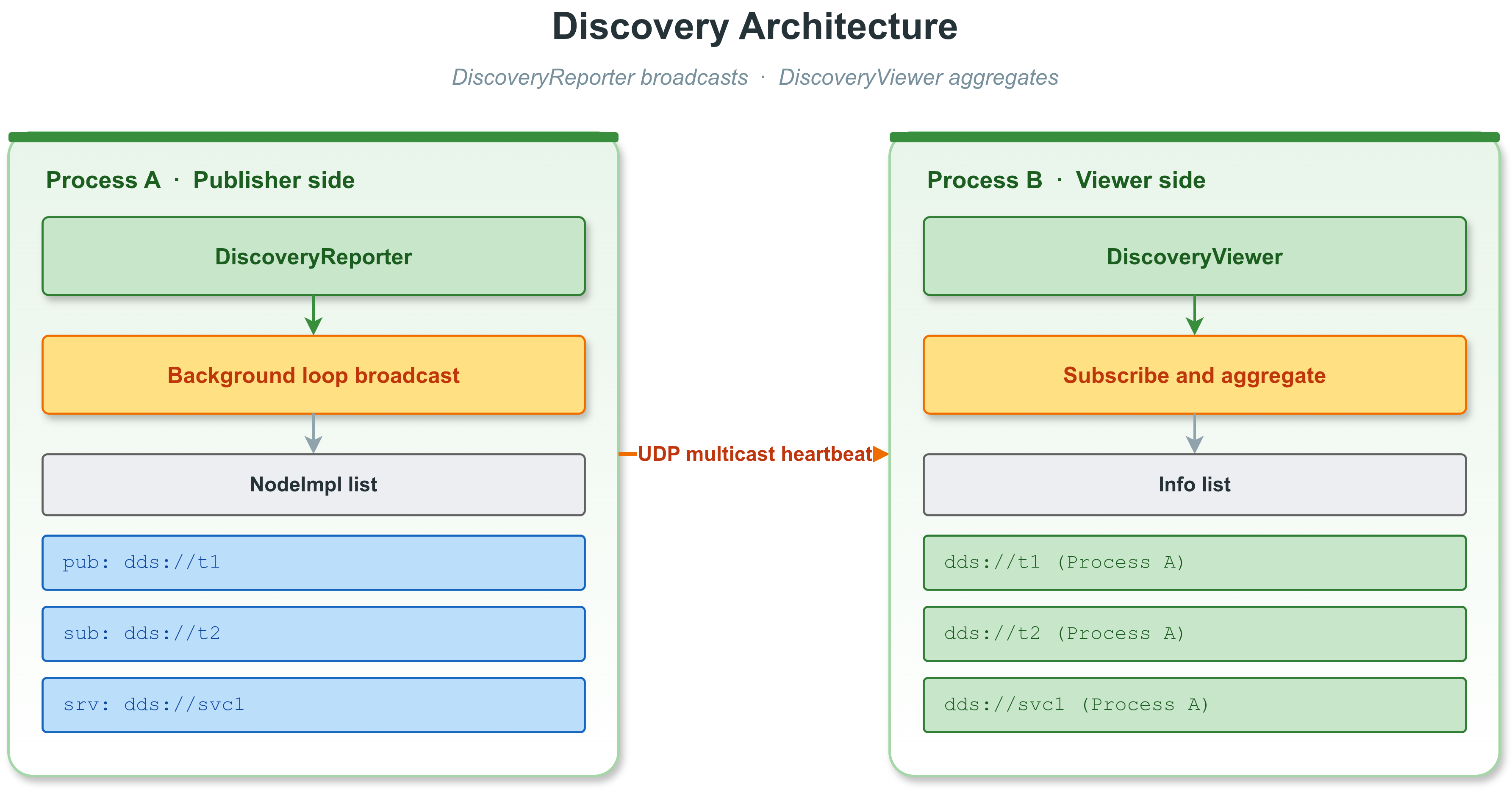
发现机制架构
1.1 发现机制的核心设计原则
- **透明自动**:NodeImpl 构造/析构时自动注册/注销,无需用户干预。
- **零依赖传输**:当前默认走 UDP 组播,地址固定为 239.255.0.100、端口 51694(见 src/extension/discovery_reporter.cc:67,71);如关闭 VLINK_DISCOVERY_MULTICAST 编译路径则退化为广播 255.255.255.255。
- **Reporter 进程级单例**:每个进程只有一个 DiscoveryReporter;DiscoveryViewer 可独立构造,也可通过 global_get() 共享。
- **心跳周期**:首次 100ms,之后每 500ms 广播一次(kReportFirstInterval=100、kReportInterval=500)。
- **心跳超时剔除**:Viewer 内部 process_timeout() 对超时进程从视图中移除。
2. DiscoveryReporter
DiscoveryReporter 是**发现上报器**,运行在每个有 VLink 节点的进程中,负责将本进程的节点信息广播给所有 DiscoveryViewer。
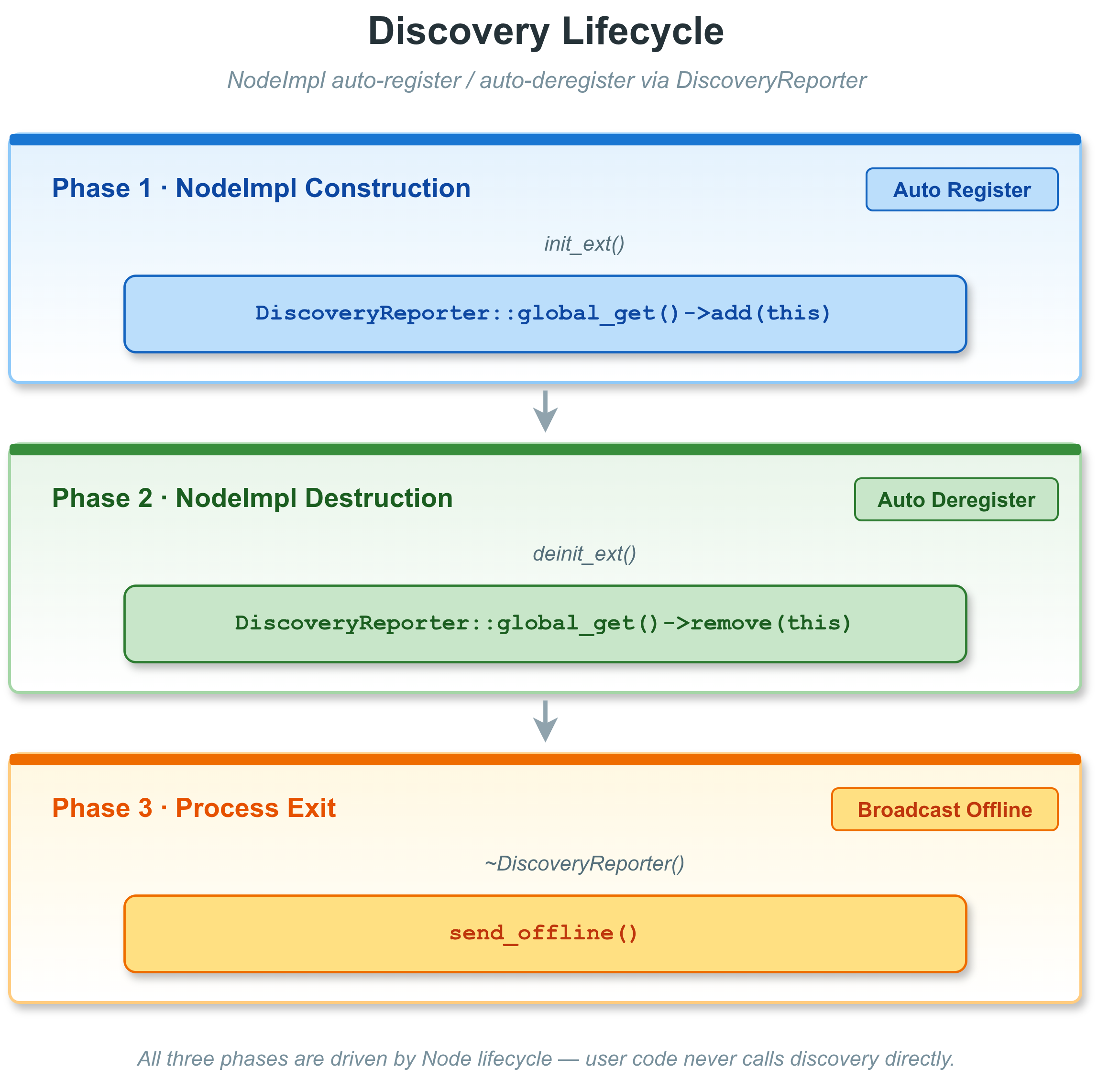
2.1 自动生命周期管理
用户通常**不需要**直接操作 DiscoveryReporter。它的生命周期完全由 VLink 运行时管理:
- 第一个 NodeImpl 构造时触发 GlobalDiscoveryReporter 的惰性构造(见 discovery_reporter.cc)。
- NodeImpl::init_ext() 调用 DiscoveryReporter::global_get()->add(this)。
- NodeImpl::deinit_ext() 调用 DiscoveryReporter::global_get()->remove(this)。
- 进程退出或节点销毁后,依赖 remove() 和 Viewer 端超时剔除;send_offline() 由编译宏 VLINK_DISCOVERY_OFFLINE 控制,**默认是 0(关闭)**,因此默认构建不会额外发送独立 offline 包。
- 环境变量 VLINK_DISCOVER_DISABLE=1 可完全禁用 Reporter;VLINK_DISCOVER_NATIVE=1 将组播接口绑定到 loopback (127.0.0.1),仅本机可收到。
Discovery 生命周期
Discovery 网络拓扑
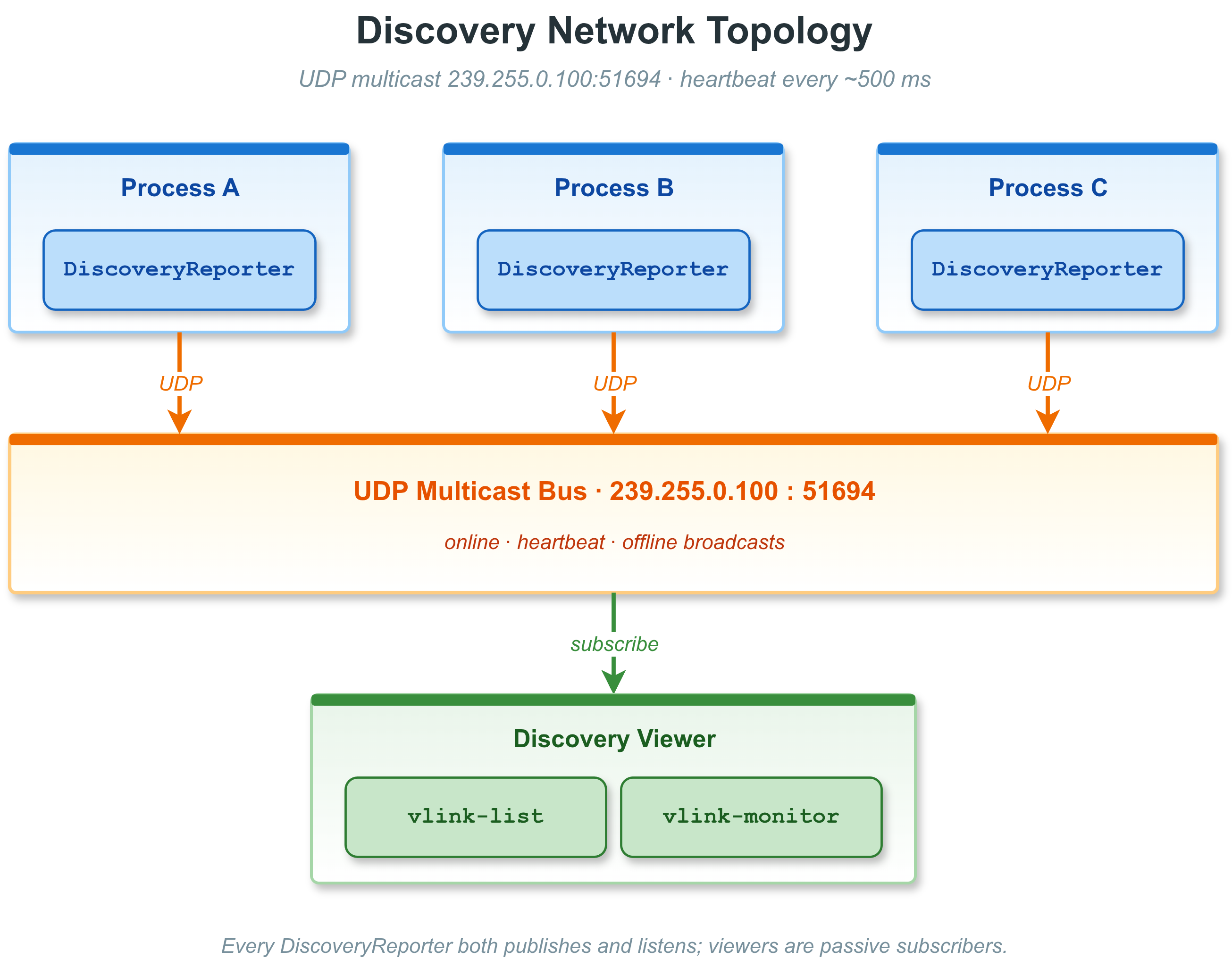
Discovery 网络
2.2 reporter 工作原理
DiscoveryReporter 继承自 MessageLoop,在独立的后台线程中运行:
- 构造阶段创建 AF_INET/SOCK_DGRAM socket、设置 IP_TTL=3、inet_addr("239.255.0.100")、端口 51694。
- Timer 首次 100ms、之后 500ms 间隔循环触发 send_report()。
- rebuild_message():收集所有已注册 NodeImpl(URL、impl_type、ser_type、schema_type、CpuProfiler 值),打包成不超过 1450 字节 MTU 的文本段,每段一条 UDP 报文。
- send_report() 对每段 sendto()。
- 析构时 send_offline()(仅当 VLINK_DISCOVERY_OFFLINE=1 编译时启用,默认不启用)。
2.3 控制发现报告的开关
通过 NodeImpl::set_discovery_enabled(false) 可以在 init() 之前关闭单个节点的发现上报。通常由 NodeImpl 子类或代理框架内部调用,用户代码不用关心。
2.4 获取全局 Reporter 实例
Background MessageLoop that reports active nodes to the discovery subsystem.
Definition discovery_reporter.h:68
static DiscoveryReporter * global_get()
Returns the process-global DiscoveryReporter singleton.
Process-level discovery reporter that broadcasts node metadata to DiscoveryViewer instances.
3. DiscoveryViewer
DiscoveryViewer 是**发现订阅器**,订阅 DiscoveryReporter 广播的消息,聚合并维护一个实时的全局节点拓扑视图。它是 vlink-list、vlink-monitor 等 CLI 工具的核心数据来源。
3.1 FilterType 过滤模式
| FilterType | 含义 |
| kFilterNone | 显示所有当前已发现的节点 |
| kFilterAvailable | 只显示当前有存活进程的节点 |
| kFilterNative | 只显示本机(同一主机名)的节点 |
3.2 基本用法
viewer.register_callback([](const std::vector<vlink::DiscoveryViewer::Info>& list) {
for (const auto& info : list) {
for (const auto& proc : info.process_list) {
}
}
});
viewer.async_run();
std::this_thread::sleep_for(std::chrono::seconds(1));
auto snapshot = viewer.get_info_list();
Background MessageLoop that aggregates live VLink endpoint discovery data.
Definition discovery_viewer.h:78
@ kFilterAvailable
Show only endpoints with live processes.
Definition discovery_viewer.h:91
Real-time view of all active VLink endpoints discovered on the current host or network.
3.3 全局单例用法
viewer->
register_callback([](
const std::vector<vlink::DiscoveryViewer::Info>& list) {
});
static DiscoveryViewer * global_get()
Returns the process-global DiscoveryViewer singleton.
void register_callback(Callback &&callback)
Registers the callback invoked when the endpoint list changes.
需要 kFilterAvailable / kFilterNative 时请自行 new DiscoveryViewer(filter),global_get() 一经创建过滤模式无法再切换。
3.4 Info 结构体详解
DiscoveryViewer::Info 描述一个 URL 下的聚合信息:
Info {
sort_index — 稳定排序键(由 Viewer 内部分配)
type — ImplType 位掩码(所有进程类型的并集)
url — 完整的 VLink URL 字符串,如 "dds://my_topic"
ser_type — 具体序列化类型名,如 "demo.proto.PointCloud"
schema_type — 粗粒度 schema 家族(kProtobuf / kFlatbuffers / kRaw / kZeroCopy / kUnknown)
process_list — 托管此 URL 的进程列表
}
DiscoveryViewer::Process 描述一个进程的信息:
Process {
type — 该进程中此 URL 的 ImplType(Publisher=发布者 / Subscriber=订阅者等)
host — 主机名(hostname)
pid — 进程 ID(uint32_t)
name — 进程可执行文件名
ip — 进程所在主机的 IP 地址
profiler — CPU 利用率(double,-1 表示未启用 CpuProfiler)
}
3.5 DiscoveryReporter vs DiscoveryViewer
| 特性 | DiscoveryReporter | DiscoveryViewer |
| 职责 | 发送本进程节点信息 | 接收并聚合跨进程/跨机节点信息 |
| UDP 方向 | sendto() | bind() + recvfrom() |
| 触发方式 | 定时器(100ms/500ms) | Socket 可读 + process_timeout() |
| 用户可见 API | 几乎无(由 NodeImpl 内部调用) | register_callback()、get_info_list()、get_ser_type()、get_schema_type()、convert_type*()、get_listen_address() |
| 过滤 | 由 NodeImpl::set_discovery_enabled() 控制 | FilterType 枚举(None / Available / Native) |
| 全局单例 | 进程内自动创建;VLINK_DISCOVER_DISABLE=1 可禁用 | global_get(),默认 kFilterNone |
| 下线事件 | send_offline() 仅在 VLINK_DISCOVERY_OFFLINE=1 编译时发送 | 依赖超时剔除 |
3.6 类型转换工具方法
static std::string get_listen_address()
Returns the intra-process address used by the discovery subsystem.
std::string get_ser_type(const std::string &url) const
Returns the serialisation type string for a given URL.
static ImplType convert_type(std::string_view str)
Converts a transport string to the corresponding ImplType value.
SchemaType get_schema_type(const std::string &url) const
Returns the coarse schema family for a given URL.
static std::string convert_type_to_view(uint32_t type)
Returns a display string for an ImplType bitmask.
SchemaType
Coarse runtime schema family used by discovery, bag metadata, and proxy routing.
Definition types.h:184
ImplType
Bitmask identifying the role of a VLink node implementation.
Definition types.h:89
4. Status 与 StatusDetail
4.1 Status 体系概述
Status 是 VLink 向 DDS 传输层对齐的**状态事件系统**,当传输层发生特定事件(如新订阅者匹配、截止时间错过)时,通过回调通知应用层。
状态事件分为写方(Writer-side)和读方(Reader-side)两组:
**写方状态**(Publisher / Server / Setter):
| 状态类型 | 触发条件 |
| kPublicationMatched | 匹配的订阅者出现或消失 |
| kOfferedDeadlineMissed | 发布者未在声明的截止时间内发布数据 |
| kOfferedIncompatibleQos | 发现了 QoS 不兼容的订阅者 |
| kLivelinessLost | 发布者未能在 liveliness 时限内主动声明 |
**读方状态**(Subscriber / Client / Getter):
| 状态类型 | 触发条件 |
| kSubscriptionMatched | 匹配的发布者出现或消失 |
| kRequestedDeadlineMissed | 订阅者未在声明的截止时间内收到数据 |
| kLivelinessChanged | 匹配发布者的 liveliness 状态发生变化 |
| kSampleRejected | 由于资源限制,传入的样本被拒绝 |
| kRequestedIncompatibleQos | 发现了 QoS 不兼容的发布者 |
| kSampleLost | 样本在送达前丢失 |
**注意**:Status 回调目前仅支持 DDS 系列传输后端(dds://、ddsc://、ddsr://、ddst://)。在其他传输后端调用 register_status_handler() 会打印 warning 并忽略。
4.2 注册状态回调
switch (status->get_type()) {
VLOG_I(
"Matched publishers: current=", matched->current_count,
" total=", matched->total_count);
break;
}
VLOG_W(
"Deadline missed: count=", missed->total_count);
break;
}
if (rejected->last_reason ==
VLOG_W(
"Sample rejected: samples limit exceeded");
}
break;
}
default:
break;
}
});
static SharedPtr create_shared(const std::string &url_str, InitType type=InitType::kWithInit)
Creates a Subscriber on the heap wrapped in a shared_ptr.
Definition subscriber-inl.h:45
#define VLOG_I(...)
Definition logger.h:850
#define VLOG_W(...)
Definition logger.h:852
@ kRequestedDeadlineMissed
Reader did not receive data within its deadline.
Definition status.h:106
@ kSubscriptionMatched
A matching publisher appeared or was removed.
Definition status.h:105
@ kSampleRejected
Incoming sample was rejected (resource limit).
Definition status.h:108
std::shared_ptr< Status::Base > BasePtr
Type alias for a shared pointer to a base status event.
Definition status.h:241
DDS-compatible status type hierarchy for VLink publisher and subscriber callbacks.
Concrete DDS-compatible status event structs with counter and handle fields.
Status event fired when a DataReader does not receive data within its requested deadline.
Definition status_detail.h:273
Status event fired when an incoming sample is rejected due to a resource limit.
Definition status_detail.h:351
@ kRejectedBySamplesLimit
Max total samples limit exceeded.
Definition status_detail.h:366
Status event fired when a DataReader gains or loses a matching DataWriter.
Definition status_detail.h:234
4.3 Status::Base 基类接口
Status::Type type = status->get_type();
std::string desc = status->get_string();
auto matched = status->as<Status::PublicationMatched>();
bool is_writer = Status::is_for_writer(type);
bool is_reader = Status::is_for_reader(type);
std::cout << *status << std::endl;
4.4 各具体状态类型字段
**PublicationMatched**(发布者端):
auto m = status->as<Status::PublicationMatched>();
m->total_count;
m->total_count_change;
m->current_count;
m->current_count_change;
m->last_subscription_handle;
**SubscriptionMatched**(订阅者端):
auto m = status->as<Status::SubscriptionMatched>();
m->total_count;
m->total_count_change;
m->current_count;
m->current_count_change;
m->last_publication_handle;
**OfferedDeadlineMissed / RequestedDeadlineMissed**:
auto m = status->as<Status::OfferedDeadlineMissed>();
m->total_count;
m->total_count_change;
m->last_instance_handle;
**SampleRejected**(拒绝原因):
auto r = status->as<Status::SampleRejected>();
r->total_count;
r->total_count_change;
r->last_reason;
r->last_instance_handle;
**LivelinessChanged**(订阅者端):
auto l = status->as<Status::LivelinessChanged>();
l->alive_count;
l->not_alive_count;
l->alive_count_change;
l->not_alive_count_change;
l->last_publication_handle;
**OfferedIncompatibleQos / RequestedIncompatibleQos**:
auto q = status->as<Status::OfferedIncompatibleQos>();
q->total_count;
q->total_count_change;
q->last_policy_id;
VLOG_I(
"QoS incompatible: ", *status);
5. 发现机制实现原理
5.1 传输层选择
发现系统基于 **UDP 组播/广播**,不依赖任何外部 DDS 中间件:
- DiscoveryReporter 当前默认使用 UDP 组播地址 239.255.0.100 发送心跳;广播模式仅在关闭组播编译路径时作为备选实现
- DiscoveryViewer 内部使用 UDP socket 接收心跳并聚合节点信息
- 支持同机跨进程的节点发现
5.2 消息格式
发现消息为序列化的进程快照,包含:
DiscoveryMessage {
host_name — 主机名
app_name — 应用程序名
pid — 进程 ID
ip — 主机 IP
profiler — CPU 使用率(来自 CpuProfiler)
is_offline — 是否为下线通知
nodes[] {
url — 节点的完整 URL
impl_type — ImplType(Publisher/Subscriber/Client/Server/Setter/Getter)
ser_type — 序列化类型字符串
schema_type — 粗粒度 schema 家族
}
}
5.3 心跳与超时剔除
- DiscoveryReporter 首次 100ms、之后每 500ms 广播一次节点列表。
- 每段 UDP 报文不超过 1450 字节 MTU,节点多时会拆成多段报文。
- DiscoveryViewer::process_timeout() 负责检测超时进程:若某进程的最后一次心跳超过阈值仍无更新,则从视图中移除。
- send_offline() 仍保留在 DiscoveryReporter 的代码中,由编译宏 VLINK_DISCOVERY_OFFLINE 控制;**默认 0 表示不发送 offline 通知**,Viewer 完全依赖超时剔除。
5.4 排序与稳定显示
DiscoveryViewer 在每次更新后调用 sort_url() 对 Info 列表排序:
- Info::operator<:按 sort_index(首次出现顺序),再按 url
- Process::operator<:按 host,再按 pid
这保证了 CLI 工具显示时的稳定顺序,不会因为心跳更新而跳动。
5.5 完整的发现数据流
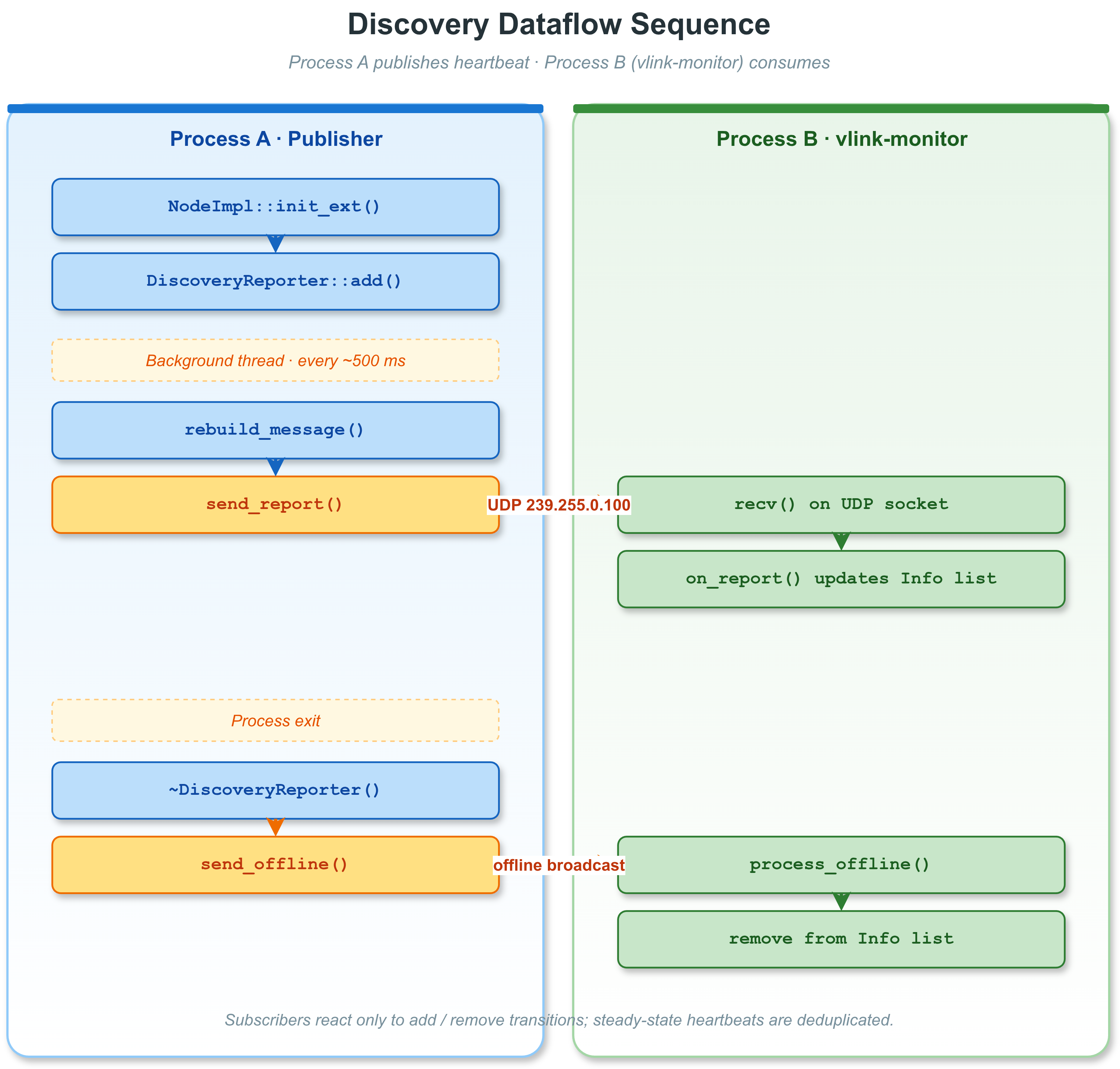
发现数据流时序
6. 实时拓扑监控示例
6.1 打印当前所有存活节点
#include <chrono>
#include <iostream>
#include <thread>
int main() {
std::cout << "=== Topology Update ===" << std::endl;
for (const auto& info : list) {
std::cout << "[" << info.url << "] "
<< " ser=" << info.ser_type << std::endl;
for (const auto& proc : info.process_list) {
std::cout << " Process: " << proc.name
<< " PID=" << proc.pid
<< " host=" << proc.host
<< " ip=" << proc.ip;
if (proc.profiler >= 0) {
std::cout << " cpu=" << proc.profiler << "%";
}
std::cout << std::endl;
}
}
std::cout << std::endl;
});
while (true) {
std::this_thread::sleep_for(std::chrono::seconds(5));
}
return 0;
}
bool async_run()
Starts the message loop on a new background thread (non-blocking).
6.2 一次性获取拓扑快照
#include <chrono>
#include <thread>
std::this_thread::sleep_for(std::chrono::seconds(2));
for (const auto& info : list) {
}
std::vector< Info > get_info_list()
Returns a snapshot of the current discovery information.
6.3 监控特定 URL 的进程
for (const auto& info : list) {
if (info.url == "dds://camera_image") {
bool has_pub = false;
bool has_sub = false;
for (const auto& proc : info.process_list) {
if (proc.type & 1) { has_pub = true; }
if (proc.type & 2) { has_sub = true; }
}
if (!has_pub) {
VLOG_W(
"No publisher for camera_image!");
}
if (!has_sub) {
VLOG_W(
"No subscriber for camera_image!");
}
}
}
});
7. 与 CLI 工具的关系
VLink 提供了两个基于 DiscoveryViewer 的 CLI 工具:
7.1 vlink-list
vlink-list(cli/list/)是一个**一次性查询**工具:
- 创建 DiscoveryViewer(kFilterNone)
- 等待若干心跳周期(约 1s)
- 打印当前拓扑表格后退出
# 列出所有存活节点
vlink-list
# 输出示例:
# URL Type SerType Processes
# dds://camera_image Pub+Sub protobuf sensor_node(PID:1234) vision_node(PID:5678)
# shm://lidar_points Pub standard lidar_node(PID:4321)
# intra://control_cmd Server+Client standard ctrl_node(PID:9999)
7.2 vlink-monitor
vlink-monitor(cli/monitor/)是一个**持续监控**工具(类似 top):
- 默认创建 DiscoveryViewer(kFilterAvailable);-n/--native 会切换到 kFilterNative。
- 注册回调,每次拓扑变化时刷新终端界面。
- 显示节点 URL、类型、进程、CPU 利用率等实时数据。
- 支持按 URL 子串过滤。
# 持续监控
vlink-monitor
# 按 URL 子串过滤(空格分隔多个子串)
vlink-monitor -i dds
vlink-monitor -i "dds shm"
-i/--filter 是 URL 子串匹配(空格分隔多个 pattern),不是传输类型枚举匹配,也不是正则。
7.3 在应用程序中嵌入监控
通过 DiscoveryViewer::global_get() 在应用程序内部访问拓扑信息,无需单独进程:
my_monitor_system.update_topology(list);
});
8. 跨网络发现配置
8.1 当前限制
VLink 发现系统基于 UDP 组播/广播,**支持同一局域网内跨进程、跨机器的节点发现**。
8.2 同机多进程发现
在同一台机器上的多个进程中,各进程的 DiscoveryReporter 会通过 UDP 组播心跳,DiscoveryViewer 可自动发现所有进程中的节点。
如需跨进程汇聚发现信息,可以:
- 使用 vlink-list / vlink-monitor CLI 工具(它们直接基于 DiscoveryViewer 做 UDP 发现聚合)
- 通过代理层(proxy/)统一汇聚来自不同进程的拓扑信息
8.3 FilterType 在跨网络场景的应用
@ kFilterNative
Show only local-host endpoints.
Definition discovery_viewer.h:92
9. 自定义发现报告内容
9.1 控制 CPU Profiler 数据上报
DiscoveryReporter 在构建发现消息时,会读取每个 NodeImpl 的 profiler 字段(CpuProfiler 实例)。
若要在发现数据中包含 CPU 使用率,需要在全局启用 CPU Profiler(VLink 内部自动处理,无需用户配置)。DiscoveryViewer::Process::profiler 字段的值:
- >= 0.0:当前节点的 CPU 使用率百分比
- < 0(即 -1):CpuProfiler 未启用或数据不可用
9.2 控制节点是否出现在发现视图
publisher->get_impl()->set_discovery_enabled(false);
bool enabled = publisher->get_impl()->get_discovery_enabled();
9.3 查询序列化类型
通过 DiscoveryViewer::get_ser_type() 和 DiscoveryViewer::get_schema_type() 可以查询任意 URL 当前使用的序列化类型与 schema 家族:
std::this_thread::sleep_for(std::chrono::seconds(2));
std::string ser = viewer->
get_ser_type(
"dds://camera_image");
if (!ser.empty()) {
VLOG_I(
"camera_image uses serialization: ", ser);
}
VLOG_I(
"camera_image schema_type: ",
static_cast<int>(schema_type));
10. 完整监控示例程序
以下是一个功能完整的节点监控程序示例,展示如何将 DiscoveryViewer 与状态回调结合使用:
#include <chrono>
#include <csignal>
#include <iostream>
#include <thread>
static volatile bool g_running = true;
void print_topology(const std::vector<DiscoveryViewer::Info>& list) {
std::cout << "\033[2J\033[H";
std::cout << "=== VLink Topology Monitor ===" << std::endl;
std::cout << "Nodes: " << list.size() << std::endl;
std::cout << std::endl;
for (const auto& info : list) {
std::cout << " " << info.url << std::endl;
std::cout << " Type: "
<< std::endl;
std::cout << " SerType: " << info.ser_type << std::endl;
std::cout << " SchemaType: " << static_cast<int>(info.schema_type) << std::endl;
std::cout << " Processes:" << std::endl;
for (const auto& proc : info.process_list) {
std::cout << " - " << proc.name
<< " [" << proc.host << ":" << proc.pid << "]"
<< " ip=" << proc.ip;
if (proc.profiler >= 0) {
std::cout << " cpu=" << proc.profiler << "%";
}
std::cout << std::endl;
}
std::cout << std::endl;
}
}
int main() {
std::cout << "[Status] Matched publishers: "
}
});
signal(SIGINT, [](int) { g_running = false; });
while (g_running) {
std::this_thread::sleep_for(std::chrono::milliseconds(100));
}
return 0;
}
int32_t current_count
Number of writers currently matched.
Definition status_detail.h:252

 1.16.1