概述
VLink WebViz 是 VLink 生态中的可视化桥接工具集。它把 VLink 中间件中的实时通信数据转换成主流可视化平台可理解的标准格式,使用户可以通过浏览器或桌面可视化器进行数据可视化、调试与分析。
WebViz 目前支持两个可视化后端:
| 后端 | 可执行程序 | 前端可视化平台 | 传输协议 | 离线转换工具 |
| Foxglove | vlink-foxglove | Foxglove Studio | WebSocket | vlink-bag2mcap |
| Rerun | vlink-rerun | Rerun Viewer | gRPC | vlink-bag2rrd |
**相关文档**:桌面 GUI 可视化工具参见 14-viewer.md;代理通信层参见 16-proxy.md;录制 / 回放 API 参见 12-bag-recording.md;CLI 工具参见 13-cli-tools.md。
整体架构
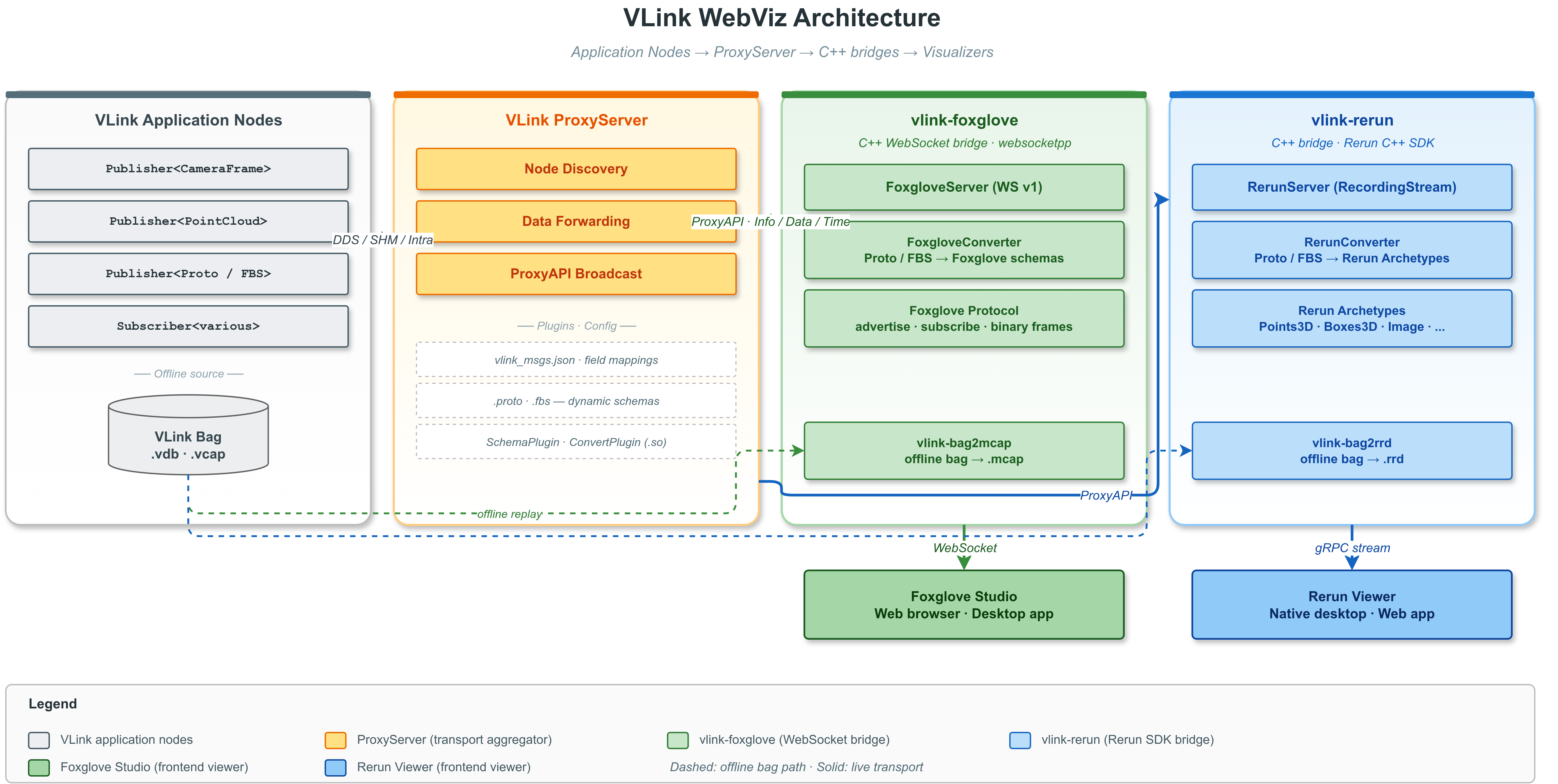
WebViz 架构
图中展示的是 proxy_api 部署路径;在 proxy_server 模式下,外部 ProxyServer + ProxyAPI 这一跳会折叠为 WebViz 进程内的 ProxyBridge 本地直连实现。
WebViz 的核心设计思想是“桥接”而非“重写”:VLink 应用节点通过各种传输后端(DDS、SHM、Intra 等)发布数据,WebViz 后端通过统一的 ProxyBridge 抽象接入这些数据流,再将 VLink 原生消息格式(Protobuf、FlatBuffers、零拷贝类型)转换为目标可视化平台的标准 Schema,通过 WebSocket(Foxglove)或 gRPC(Rerun)推送到前端可视化器。
ProxyBridge 提供两种运行模式:
- proxy_api:WebViz 作为外部客户端,通过 ProxyAPI 连接独立运行的 ProxyServer
- proxy_server:WebViz 在本进程内直接使用 DiscoveryViewer + Publisher / Subscriber 接入 VLink 网络,省去一次代理中转 DDS 通信和一个额外进程
完整数据链路
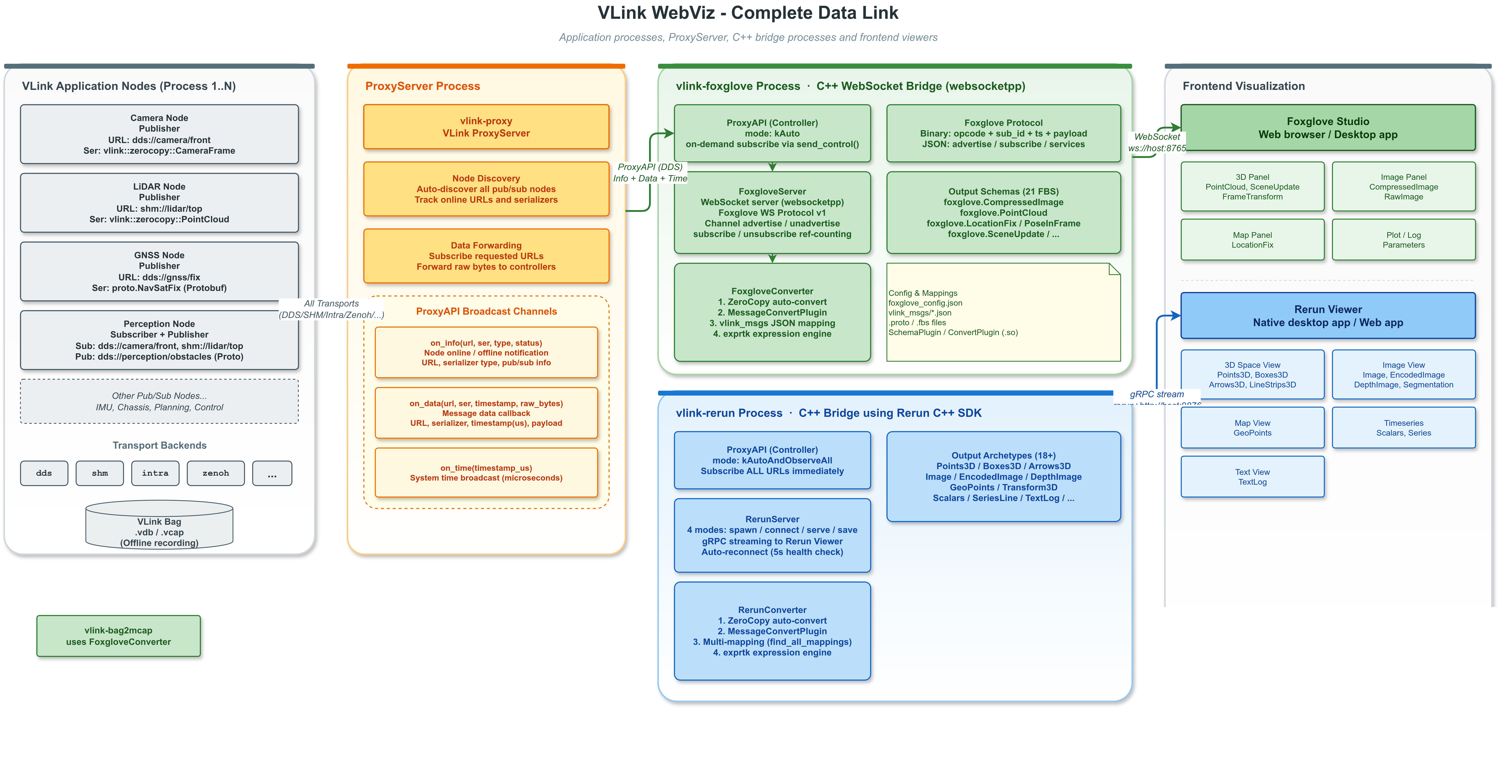
WebViz 数据链路
图中主链路展示的是 proxy_api 形态;若选择 proxy_server,则 WebViz 会直接进行节点发现与原始 Topic 订阅 / 发布,不再经过外部代理进程。
完整链路如下:
- VLink 应用节点通过各种传输后端(DDS / SHM / Intra / Zenoh)发布消息,每个 Publisher 以 <transport>://<topic> 的 URL 标识。
- Proxy 接入层有两种部署方式:
- proxy_api:独立 ProxyServer 聚合所有传输后端的数据,WebViz 通过 ProxyAPI 接收 Info / Data / Time
- proxy_server:WebViz 进程内直接做节点发现与原始 Topic 订阅 / 发布,不再经过外部 ProxyServer
- WebViz 后端(vlink-foxglove 或 vlink-rerun)按需订阅感兴趣的 URL,并在 controller 模式下保留向 VLink 注入消息的能力。
- Converter 根据消息的序列化类型,通过优先级链(零拷贝 > 插件 > JSON 映射)将 VLink 原生消息转换为目标平台格式。
- 推送协议层将转换后的数据通过 WebSocket(Foxglove)或 gRPC(Rerun)发送到前端。
- 前端可视化器(Foxglove Studio / Rerun Viewer)接收并展示这些数据。
数据流
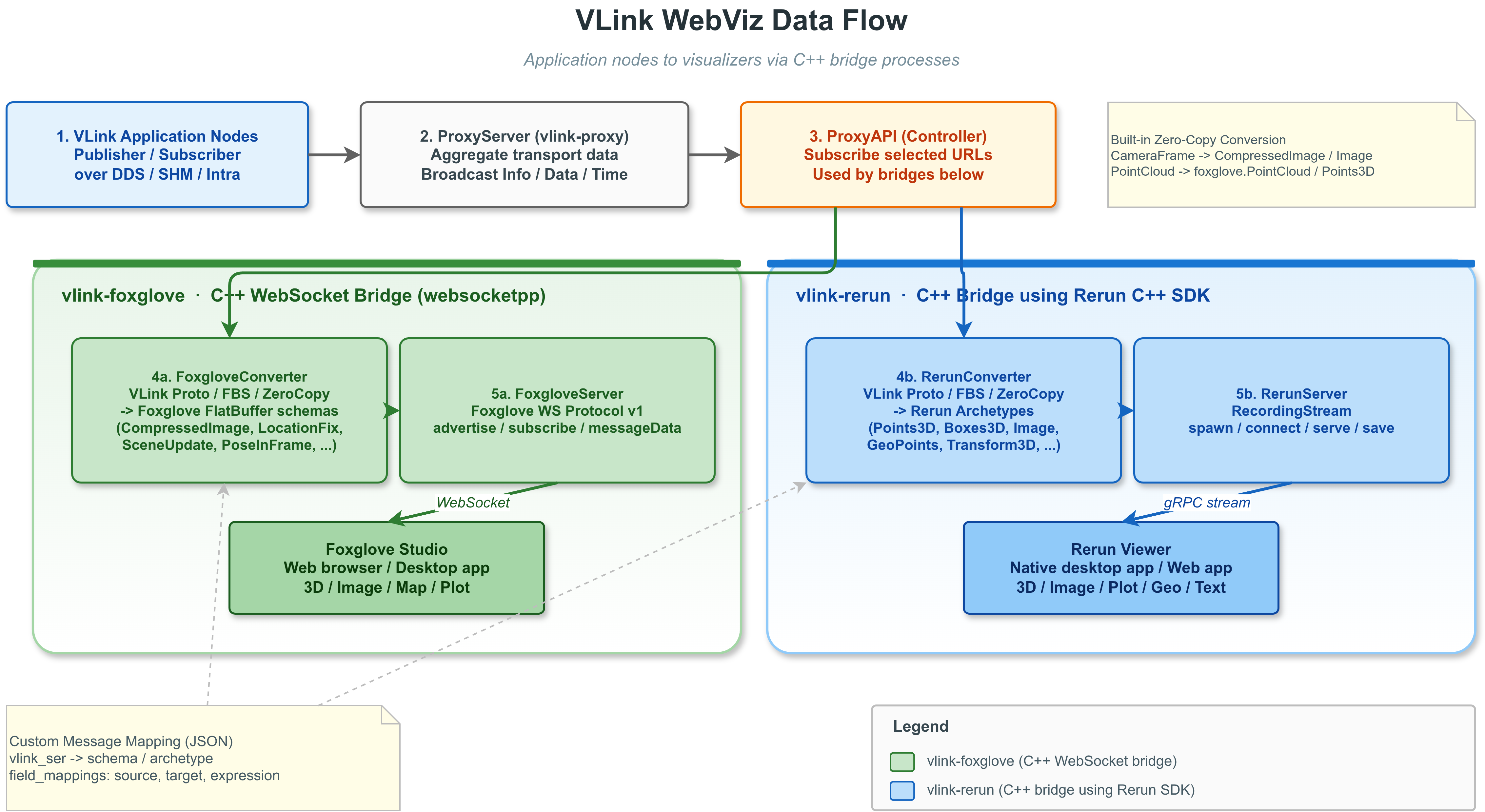
WebViz 数据流
数据流图展示的是统一抽象视角:ProxyBridge 对外提供同样的 Info / Data / Time 回调,而底层可选择 proxy_api 或 proxy_server 两种接入方式。
完整的数据流路径:
- VLink 应用节点通过任意传输后端(dds://、shm://、intra:// 等)发布消息。
- Proxy 接入层以 proxy_api 或 proxy_server 模式向 WebViz 暴露 Info / Data / Time 数据流。
- WebViz 后端根据前端订阅情况或自身策略,按需订阅感兴趣的 URL。
- Converter 将 VLink 原生消息反序列化并转换为目标平台的可视化 Schema。
- 推送协议层将转换后的数据通过 WebSocket(Foxglove)或 gRPC(Rerun)推送到前端。
- 前端可视化用户在 Foxglove Studio 或 Rerun Viewer 中查看实时数据。
Proxy 接入模式与共享参数
两种模式的定位如下:
| 模式 | 连接方式 | 适用场景 | 特点 |
| proxy_api | WebViz 连接独立 ProxyServer | 多机部署、需要复用统一代理控制面 | 兼容现有 Proxy 生态,支持版本匹配、外部代理统一转发 |
| proxy_server | WebViz 进程内直接发现 / 订阅 / 发布 VLink Topic | 单机调试、车端本地可视化、对时延和资源更敏感 | 少一次代理中转 DDS 通信,少一个进程开销 |
共享 CLI 参数由 vlink-foxglove 和 vlink-rerun 同时支持:
| 参数 | 说明 | 默认值 |
| --proxy_interface | 代理接入模式:proxy_api 或 proxy_server | proxy_api |
| --proxy_role | WebViz 角色;proxy_api 支持 controller / listener,proxy_server 仅支持 controller | controller |
| --proxy_domain_id | WebViz 进程使用的 DDS 域 ID | 0 |
| --proxy_dds_impl | DDS 实现(dds / ddsc / ddsr / ddst,仅 proxy_api 使用) | dds |
| --proxy_native | 仅使用本机回环流量 | false |
| --proxy_tcp | 为 DDS Topic 启用 TCP 传输 | false |
| --proxy_bind_ip | DDS 绑定 IP 地址 | 空 |
| --proxy_peer_ip | DDS 单播对端 IP | 空 |
| --proxy_buf_size | DDS Socket 缓冲区大小(字节) | 0 |
| --proxy_mtu_size | DDS MTU 大小(字节) | 0 |
| --proxy_key | proxy_api 模式的安全密钥 | 空 |
| --proxy_reliable | proxy_api 模式的可靠转发 | false |
| --proxy_direct | proxy_api 模式的直连 SHM 转发 | false |
| --proxy_no_match_version | 关闭 proxy_api 的版本匹配 | false |
| --proxy_data_callback_mode | 代理数据回调派发模式:direct 或 queued | queued |
| --proxy_max_packet_size | proxy_server 模式下允许转发的最大 payload(MiB)。默认 0.0 表示不限制(webviz/proxy_bridge.cc:232,861 对 >0 的值才启用过滤);要限制大包则设置为正数 | 0.0 |
| --proxy_use_iox | proxy_server 模式下启动内嵌 Iceoryx RouDi | false |
| --proxy_iox_config | proxy_server 模式下的 Iceoryx TOML 配置路径 | 空 |
| --proxy_iox_strategy | proxy_server 模式下的 Iceoryx 内存策略 | 1 |
| --proxy_iox_monitoring | proxy_server 模式下的 Iceoryx 监控开关(on / off) | on |
共享 JSON 配置结构如下:
{
"proxy": {
"interface_mode": "proxy_api",
"role": "controller",
"domain_id": 0,
"dds_impl": "dds",
"native": false,
"enable_tcp": false,
"bind_ip": "",
"peer_ip": "",
"buf_size": 0,
"mtu_size": 0,
"data_callback_mode": "queued",
"api": {
"security_key": "",
"reliable": false,
"direct": false,
"match_version": true
},
"server": {
"max_packet_size": 4.0,
"use_iox": false,
"iox_config": "",
"iox_strategy": 2,
"iox_monitoring": true
}
}
}
共享配置项说明:
| 配置项 | 说明 |
| proxy.interface_mode | 代理接入模式:proxy_api 或 proxy_server |
| proxy.role | WebViz 角色:controller 或 listener |
| proxy.domain_id | DDS 域 ID |
| proxy.dds_impl | DDS 实现(dds / ddsc / ddsr / ddst;仅 proxy_api 使用) |
| proxy.native | 是否只使用回环流量 |
| proxy.enable_tcp | 是否对 DDS Topic 启用 TCP |
| proxy.bind_ip | DDS 绑定 IP 地址 |
| proxy.peer_ip | DDS 单播对端 IP |
| proxy.buf_size | DDS Socket 缓冲区大小 |
| proxy.mtu_size | DDS MTU 大小 |
| proxy.data_callback_mode | 代理数据回调模式:direct 或 queued |
| proxy.api.security_key | proxy_api 模式的安全密钥 |
| proxy.api.reliable | proxy_api 模式是否使用可靠转发 |
| proxy.api.direct | proxy_api 模式是否使用直连 SHM 转发 |
| proxy.api.match_version | proxy_api 模式是否与外部 ProxyServer 做版本匹配 |
| proxy.server.max_packet_size | proxy_server 模式下允许转发的最大 payload(MiB)。默认 0.0 代表不限制(webviz 的桥接实现对 >0 才启用阈值判断),示例中写 4.0 仅为演示用 |
| proxy.server.use_iox | proxy_server 模式下是否启动内嵌 Iceoryx RouDi |
| proxy.server.iox_config | proxy_server 模式的 Iceoryx 配置文件 |
| proxy.server.iox_strategy | proxy_server 模式的 Iceoryx 内存策略 |
| proxy.server.iox_monitoring | proxy_server 模式的 Iceoryx 监控开关 |
设计约束:
- proxy_api 适合复用独立代理的场景,--proxy_reliable、--proxy_direct、--proxy_no_match_version 只在该模式下生效
- proxy_data_callback_mode=queued 会把 DataCallback 串行化到上层 WebViz 服务(vlink-foxglove 或 vlink-rerun)持有的 MessageLoop;direct 则直接在桥接回调线程转发
- proxy_server 适合低时延本地桥接,--proxy_max_packet_size、--proxy_use_iox 等仅在该模式下生效
- proxy_server 采用进程内本地桥接语义,不支持 proxy_role=listener
- proxy_server 模式会直接订阅/发布原始 VLink Topic,因此能减少一次代理中转 DDS 通信和一个额外进程
编译选项
CMake 选项
在根 CMakeLists.txt 中:
option(ENABLE_WEBVIZ "Enable webviz" OFF)
WebViz 子目录中可独立控制两个后端:
option(ENABLE_WEBVIZ_FOXGLOVE "Enable Foxglove for webviz" ON)
option(ENABLE_WEBVIZ_RERUN "Enable Rerun for webviz" OFF)
WebViz 的单元测试走项目统一的测试开关:
option(ENABLE_TEST "Enable test" ON)
说明:
- ENABLE_WEBVIZ 默认 OFF,且在顶层 CMakeLists.txt 中依赖 ENABLE_PROXY(ENABLE_WEBVIZ=ON 但 ENABLE_PROXY=OFF 时会打印 warning 并关闭 WebViz)
- ENABLE_WEBVIZ=ON 只会启用 WebViz 总入口;ENABLE_WEBVIZ_FOXGLOVE 默认 ON,ENABLE_WEBVIZ_RERUN 默认 OFF,若需要 vlink-rerun,还需显式打开 ENABLE_WEBVIZ_RERUN=ON
- vlink-foxglove 是 C++ WebSocket bridge 可执行文件(基于 websocketpp),把 VLink 数据按 Foxglove schema 推给浏览器里的 Foxglove Studio,**不是纯浏览器端程序**
- vlink-rerun 是 C++ 可执行文件,使用 Rerun 官方 C++ SDK(<rerun.hpp>),支持 spawn / connect / serve / save 四种模式,**同样不是纯浏览器端程序**
- 两者都链接 vlink::proxy_api(webviz/CMakeLists.txt),因此离不开 ENABLE_PROXY
- vlink-rerun 及 vlink-bag2rrd 还要求本机能找到 rerun_sdk
- 当前仓库没有额外的 WebViz 专属测试目标;仍沿用项目统一测试框架
依赖项
| 依赖库 | 用途 | 两者共用 | Foxglove 专用 | Rerun 专用 |
| vlink::all | proxy_server 本地桥接、公用运行时 | ✅ | | |
| vlink::proxy_api | proxy_api 通信层 | ✅ | | |
| protobuf | Protobuf 消息动态解析 | ✅ | | |
| flatbuffers | FlatBuffers 消息处理 | ✅ | | |
| nlohmann/json | JSON 配置解析 | ✅ | | |
| argparse | 命令行参数解析 | ✅ | | |
| exprtk | 数学表达式引擎 | ✅ | | |
| websocketpp + asio | WebSocket 服务端 | | ✅ | |
| rerun_sdk | Rerun C++ SDK | | | ✅ |
编译与安装
#编译(需先确保依赖可用)
cmake -B build -DENABLE_WEBVIZ=ON -DENABLE_WEBVIZ_RERUN=ON
cmake --build build -j8
#安装
cmake --install build
安装后,可执行程序位于 <prefix>/bin/:
- vlink-foxglove(实时 Foxglove 桥接服务)
- vlink-rerun(实时 Rerun 桥接服务)
- vlink-bag2mcap(Bag 文件离线转换为 MCAP 格式)
- vlink-bag2rrd(Bag 文件离线转换为 RRD 格式)
配置文件安装到 <prefix>/etc/vlink/(路径由 INSTALL_CONFIG_DIR CMake 缓存变量决定,默认 etc/vlink)下的工具子目录:
- foxglove/foxglove_config.json(以及 foxglove/vlink_msgs/、foxglove/foxglove_msgs/、foxglove/rpc_msgs/ 目录)
- rerun/rerun_config.json(以及 rerun/vlink_msgs/ 目录)
Foxglove 后端(vlink-foxglove)
功能概述
vlink-foxglove 是一个实时 WebSocket 桥接服务,实现了 Foxglove WebSocket Protocol v1,将 VLink 中间件的实时数据流转换为 Foxglove Studio 可直接消费的标准 FlatBuffer 或 Protobuf 编码消息。
核心能力:
- **实时数据桥接**:通过 WebSocket 将 VLink 实时数据推送到 Foxglove Studio
- **自动通道发现**:通过 ProxyBridge 自动发现系统中所有在线 URL,动态 advertise/unadvertise
- **消息格式转换**:通过 FoxgloveConverter 将 VLink Protobuf/FlatBuffers/零拷贝类型转换为 Foxglove 标准 Schema
- **自定义消息映射**:通过 JSON 配置文件定义任意 VLink 消息类型到 Foxglove Schema 的映射规则
- **数学表达式引擎**:字段映射支持 exprtk 数学表达式,可在转换过程中进行单位换算、坐标变换等计算
- **话题过滤**:支持黑白名单机制,精确控制哪些 URL 对外可见
- **时间同步**:支持从消息中提取消息级时间戳(timestamp_field);若消息未显式提供消息级时间戳,则回退到最近一次 Time 回调提供的 proxy-server 系统时间,并结合本地经过时间外推得到传输侧 wall-clock 兜底时间。该时间仅用于传输侧兜底,不代表采集时间或传感器时间
- **连接图**:支持 connectionGraph 能力,在 Foxglove 中查看节点拓扑
- **客户端发布**:支持 clientPublish 能力,Foxglove Studio 前端消息经 foxglove_msgs 或 ConvertPlugin 转换后调用桥接层 send_data() 发往 VLink
- **服务调用**:支持 Foxglove Service Call,经 rpc_msgs/*.json 示例配置将前端 JSON 请求映射到 VLink Client 调用,再把后端响应转换回前端 JSON
- **资源获取**:支持 fetchAsset 能力,从配置的资源目录中提供文件下载
- **插件扩展**:支持 SchemaPlugin(动态 Schema 注册)和 MessageConvertPlugin(自定义转换逻辑)
命令行参数
| 参数 | 说明 | 默认值 |
| -p, --port | WebSocket 服务端口 | 8765 |
| -a, --address | WebSocket 绑定地址 | 0.0.0.0 |
| -c, --config | JSON 配置文件路径 | 空 |
| --name | Foxglove 服务名称 | vlink-foxglove |
| --proto_dir | Proto 文件目录(动态解析) | 空 |
| --fbs_dir | FBS 文件目录(动态 FlatBuffers 解析) | 空 |
| --schema_plugin | Schema 插件共享库路径 | 空 |
| --convert_plugin | 消息转换插件共享库路径 | 空 |
| --convert_plugin_config | 转换插件配置字符串 | 空 |
| --vlink_msgs | vlink_msgs 映射文件路径(可多个) | 空 |
| --foxglove_msgs | foxglove_msgs 映射文件路径(仅 Foxglove) | 空 |
| --rpc_msgs | rpc_msgs RPC 映射文件路径(可多个) | 空 |
| --send_time | 启用向前端推送时间更新 | false |
| --parameters_url | Foxglove Parameters 下发绑定的 VLink URL;仅用于 setParameters 时创建 Setter<Bytes> | 空 |
| --parameters_encoding | 参数后端序列化格式:json/protobuf/flatbuffer(兼容读取 flatbuffers) | json |
| -i, --filter | URL 过滤字符串,空格分隔,大小写不敏感 | 空 |
| -k, --black | 将 -i/--filter 作为黑名单模式 | false |
| --allow_multiple | 允许同机同时运行多个 vlink-foxglove 实例 | false |
共享代理参数请参考上文“**Proxy 接入模式与共享参数**”章节,vlink-foxglove 支持完整的 --proxy_* 选项集。
握手要求:
- Foxglove 客户端必须协商 foxglove.websocket.v1 子协议;未带该子协议的连接会被直接拒绝。
配置文件
foxglove_config.json 是 vlink-foxglove 的根配置文件。仅当显式传入 --config 时才会加载;未传入时不会在当前目录或上级目录自动搜索配置文件。
配置文件结构:
{
"name": "vlink-foxglove-bridge",
"port": 8765,
"address": "0.0.0.0",
"send_time": false,
"filter": {
"whitelist": [],
"blacklist": []
},
"capabilities": {
"time": false,
"connection_graph": true,
"publish": true,
"rpcs": true,
"assets": false
},
"parameters": {
"url": "dds://foxglove/parameters",
"encoding": "json",
"values": [
{ "name": "vehicle.mode", "value": "AUTO" },
{ "name": "control.max_speed", "value": 12.5, "type": "float64" },
{ "name": "planner.enable_debug", "value": true }
]
},
"proxy": {
"interface_mode": "proxy_api",
"role": "controller",
"domain_id": 0,
"dds_impl": "dds",
"native": false,
"enable_tcp": false,
"bind_ip": "",
"peer_ip": "",
"buf_size": 0,
"mtu_size": 0,
"api": {
"security_key": "",
"reliable": false,
"direct": false,
"match_version": true
},
"server": {
"max_packet_size": 4.0,
"use_iox": false,
"iox_config": "",
"iox_strategy": 2,
"iox_monitoring": true
}
},
"proto_dir": "",
"fbs_dir": "",
"schema_plugin_path": "",
"convert_plugin_path": "",
"convert_plugin_config": "",
"vlink_msgs": [
"vlink_msgs/example_gps.json",
"vlink_msgs/example_imu.json",
"vlink_msgs/example_obstacle.json",
"vlink_msgs/example_frame_transform.json",
"vlink_msgs/example_laserscan.json",
"vlink_msgs/example_log.json",
"vlink_msgs/example_raw_image.json",
"vlink_msgs/example_camera_calibration.json",
"vlink_msgs/example_joint_states.json"
],
"foxglove_msgs": [
"foxglove_msgs/example_command.json",
"foxglove_msgs/example_command_flatbuffers.json",
"foxglove_msgs/example_command_json_proto_schema.json",
"foxglove_msgs/example_json_payload.json"
],
"rpc_msgs": [
"rpc_msgs/example_set_mode_rpc.json",
"rpc_msgs/example_reset_rpc.json"
]
}
webviz 下的本地配置 / 映射 JSON 统一使用 snake_case 键名,例如 schema_name、schema_encoding、encoding、default_value。 Foxglove WebSocket 协议自身的在线报文字段仍然保持官方定义,例如 schemaName、channelId、serviceId;这些是协议字段,不是本地配置键。 同一个映射文件若写成 JSON 数组,则要求数组内每一项都合法;任意一项校验失败时,该文件整体不会生效,避免部分加载导致行为不确定。
| 配置项 | 说明 |
| name | 服务名称,显示在 Foxglove Studio 中 |
| port | WebSocket 端口号 |
| address | 绑定 IP 地址 |
| filter.whitelist | URL 白名单;若写成字符串,则按空格切分并做大小写不敏感子串匹配;若写成字符串数组,则通常应填写完整 URL,并按数组元素做严格精确匹配 |
| filter.blacklist | URL 黑名单;若写成字符串,则按空格切分并做大小写不敏感子串匹配;若写成字符串数组,则通常应填写完整 URL,并按数组元素做严格精确匹配 |
| capabilities.time | 是否显式开启 Foxglove time capability;若配置了 send_time 或存在 converter: "send_time" 的内部时间源,服务端仍会自动对外暴露 time capability |
| capabilities.connection_graph | 是否支持连接图 |
| capabilities.publish | 是否允许前端下发消息并回写到 VLink;若配置了 foxglove_msgs 且未显式关闭,默认会自动打开 |
| capabilities.rpcs | 是否对前端暴露 Service Call;若配置了 rpc_msgs 且未显式关闭,默认会自动打开 |
| capabilities.assets | 是否开放 fetchAsset;需要同时配置 asset_dirs |
| parameters.url | Foxglove setParameters 下发绑定的后端 VLink URL;配置后会创建 Setter<Bytes> 将参数更新写到该 URL;该能力不受 topic URL filter 约束 |
| parameters.encoding | 写往 parameters.url 的后端序列化格式,支持 json / protobuf / flatbuffer,并兼容读取 flatbuffers;默认 json |
| parameters.values | 前端 Parameters panel 初始参数表;Foxglove server 用它回复 getParameters / subscribeParameterUpdates;未配置时面板初始为空。这里的每个条目都必须显式包含 value |
| send_time | 是否推送 Proxy 服务时间到前端(默认 false);这是独立的内部时间流,不依赖前端 channel subscribe |
| proxy | 共享代理配置对象;字段定义见“Proxy 接入模式与共享参数” |
| proto_dir | .proto 文件目录(相对路径基于配置文件目录) |
| fbs_dir | .fbs 文件目录 |
| schema_plugin_path | Schema 插件共享库路径(相对路径基于配置文件目录) |
| convert_plugin_path | 转换插件共享库路径(相对路径基于配置文件目录) |
| convert_plugin_config | 转换插件配置字符串;按原样传给插件,不做相对路径解析 |
| vlink_msgs | vlink_msgs 映射文件列表(相对路径基于配置文件目录) |
| foxglove_msgs | foxglove_msgs 映射文件列表(相对路径基于配置文件目录) |
| rpc_msgs | RPC 映射文件列表;仓库示例位于 rpc_msgs/ |
| asset_dirs | 允许 fetchAsset 访问的目录列表;相对路径基于配置文件目录,不存在的目录会被忽略,若最终为空则 assets 能力会自动关闭 |
filter 必须是对象,filter.whitelist / filter.blacklist 必须是字符串或字符串数组;capabilities 必须是对象;parameters 必须是对象;vlink_msgs / foxglove_msgs / rpc_msgs / asset_dirs 必须是字符串数组。上述字段类型写错时,当前配置文件会直接判定为无效。
foxglove_msgs 前端下发映射
foxglove_msgs 仅用于 Foxglove 的 clientPublish / Publish panel 下发链路。Foxglove 前端下发到后端的 payload 固定按 JSON 处理;foxglove_msgs 只负责把这份前端 JSON 编成目标 ser 对应的后端 payload,然后调用桥接层 send_data() 发回 VLink。
它的职责边界需要明确:
- foxglove_msgs 负责“前端按 url 发布一条消息”
- rpc_msgs 负责“前端按 service name 发起一次请求-响应调用”
- Foxglove 的 Variables / Variable Slider 是前端布局变量,不是后端 WebSocket 协议能力;后端不会直接收到“变量更新”
- Foxglove 的 Parameters 面板显示的数据,由 parameters.values 提供;前端修改后的参数更新,再通过 parameters.url 下发到后端
- 仅配置 parameters.url 而不配置 parameters.values 时,Parameters 面板初始会是空的;parameters.url 只负责把修改后的参数下发到后端,不负责生成前端参数列表
- Foxglove 内置 Teleop panel 当前不适用于 custom WebSocket 数据源;它不会向 webviz/foxglove 发送 clientPublish 消息。若要做遥控,请改用 Publish panel、Service Call panel,或自定义 Foxglove extension panel
匹配顺序如下:
- 先按前端 publish 的 url + schema_name + schema_encoding 尝试命中 foxglove_msgs;若前端没有把这些字段全部带上,后端会用本地映射把缺失的 schema 回填
- 只有在没有命中静态 foxglove_msgs 时,才会退回 ConvertPlugin 的 can_convert_frontend() / get_publish_info() 做兜底
只要配置了 foxglove_msgs,capabilities.publish 在未显式配置时会自动打开。仅配置 convert_plugin_path 时不会自动开启 publish,因为后端无法主动 advertise 出固定的 Publish channels。 当前 serverInfo.supportedEncodings 固定只有 ["json"],因为 Publish panel 和 Service Call panel 面向前端的输入都被收敛成 JSON。
convert_plugin_config 无论来自命令行还是 JSON,都会作为原始配置字符串传给 ConvertPlugin,不会被当作文件路径展开。
{
"url": "dds://vehicle/control/cmd",
"encoding": "protobuf",
"ser": "control.proto.VehicleCmd"
}
| 字段 | 必填 | 说明 |
| encoding | 否 | 目标后端 payload 编码,支持 json / text / protobuf / flatbuffers;对 protobuf / flatbuffers 目标应显式提供;对 ser: "json" / "text" 可省略并自动推导 |
| schema_name | 否 | 前端 JSON schema 名称;若与 ser 相同可省略,后端会自动继承 |
| schema_encoding | 否 | 前端 schema 编码;仅支持 jsonschema / json |
| schema | 否 | 前端 JSON schema 内容;省略时会按目标 ser 自动生成默认 JSON schema |
| url | 否 | 目标 URL 选择器。可缺省;可写单个字符串、字符串数组,或 { "whitelist": ..., "blacklist": ... } 对象 |
| ser | 是 | 转换后的目标 VLink 序列化类型 |
补充规则:
- Foxglove 前端下发到后端的输入一律按 JSON 处理,不再配置前端 encoding
- foxglove_msgs 这类前端下发映射配置不接受单独的 schema_type 字段;当前实现会根据 encoding 解析出目标 family,并在运行时继续把解析后的 schema_type 带入后端路由元数据
- url 缺省时,表示这条映射不限制 URL;最终发送到后端的目标 URL 直接取前端 publish 的 topic
- url 为字符串时,表示单个精确 URL;为字符串数组时,表示多个精确 URL,并会为这些 URL 提前创建 Publish channels
- url 为对象时,复用 filter.whitelist / filter.blacklist 的语义:字符串按空格切词做大小写不敏感子串匹配,数组按完整 URL 做严格精确匹配
- url 对象里的 whitelist / blacklist 若不是字符串或字符串数组,会直接判定该映射无效
- foxglove_msgs 不再单独维护前端别名 topic;前端 topic 直接等于运行时 URL
- 前端下发链路不再支持 field_mappings
- foxglove_msgs 不再支持 passthrough / passthrough_json
- 对于“前端 JSON,但目标 ser 是 Protobuf / FlatBuffers”的场景,后端会直接用官方 JSON 解析能力把 JSON 编成目标二进制
- 若显式写了 schema / schema_path,则必须能解析成合法 JSON schema;配置错误不会再静默回退成自动生成 schema
- 若只配置了 ConvertPlugin 而没有静态精确 url 的 foxglove_msgs,插件仍然可以处理前端 publish,但需要显式开启 capabilities.publish,并且后端无法主动 advertise 出固定的 Publish panel channels
foxglove_msgs 示例目录
仓库内置了多种前端下发示例:
- webviz/foxglove/etc/foxglove_msgs/example_command.json:JSON -> Protobuf,直接使用目标 Protobuf schema
- webviz/foxglove/etc/foxglove_msgs/example_command_json_proto_schema.json:显式 JSON schema + JSON -> Protobuf
- webviz/foxglove/etc/foxglove_msgs/example_command_flatbuffers.json:JSON -> FlatBuffer
- webviz/foxglove/etc/foxglove_msgs/example_nested_expression.json:嵌套 JSON -> Protobuf 直接路由
- webviz/foxglove/etc/foxglove_msgs/example_json_payload.json:转换后输出 JSON payload
- webviz/foxglove/etc/foxglove_msgs/example_repeated_protobuf.json:前端数组 JSON -> Protobuf 直接路由
- webviz/foxglove/etc/foxglove_msgs/example_teleop_cmd_vel.json:为 custom WebSocket 场景提供的 Teleop 替代写法,配合 Publish panel 发送 Twist 风格控制消息
rpc_msgs RPC 映射
rpc_msgs 只用于 Foxglove Service Call panel。Service Call panel 在前端是“输入 service name,然后发起一次请求并等待响应”,因此 rpc_msgs 不应该被拿来承载普通遥控 topic、按钮模板或滑块模板。
每条配置包含:
- request:前端请求 JSON schema
- 顶层 url / ser / encoding:后端 RPC 请求目标;url 不能缺省
- response:后端响应如何回到前端;当前实现要求显式提供 response,并且至少给出 response.ser
- schema / schema_name / schema_encoding:定义前端请求或响应的 schema
- url 同样受全局 filter.whitelist / filter.blacklist 约束;被过滤掉的 RPC 不会对前端 advertise,前端强行调用也会被后端拒绝
补充说明:
- 当前 webviz/foxglove 对前端宣告的 supportedEncodings 固定只有 ["json"]
- rpc_msgs.request 描述的是前端请求 JSON schema
- rpc_msgs.response 描述的是前端响应 JSON schema
- 顶层 url / ser / encoding 描述的是后端请求目标
- response.ser 描述的是后端 RPC 响应的实际序列化类型;后端会把它解码后统一回前端 JSON
- response.encoding 目前仅支持 json / text / protobuf / flatbuffers,不支持 zerocopy
{
"name": "vehicle/set_mode",
"type": "vehicle.SetMode",
"timeout_ms": 1500,
"request": {},
"url": "dds://vehicle/service/set_mode",
"encoding": "protobuf",
"ser": "control.proto.SetModeRequest",
"response": {
"encoding": "protobuf",
"ser": "control.proto.SetModeResponse"
}
}
内置示例:
- webviz/foxglove/etc/rpc_msgs/example_set_mode_rpc.json
- webviz/foxglove/etc/rpc_msgs/example_reset_rpc.json
按前端能力反推后的后端设计
Foxglove 前端常见的几个交互入口,在 webviz 里应该对应成下面这三类,而不是混在一起:
| Foxglove 前端功能 | 后端能力 | 当前配置入口 | 说明 |
| Publish panel / 按 url 下发控制消息 | clientPublish | foxglove_msgs | 适合遥控、调试命令、模板化控制消息 |
| Service Call panel | services | rpc_msgs | 适合请求-响应式调用;前端以 service name 选服务 |
| Variables / Variable Slider | 前端布局变量 | 无后端配置 | 变量值留在前端布局内部,可被 Publish panel 模板引用,但不会自动变成后端协议 |
| Parameters panel | parameters / parametersSubscribe | parameters.values + parameters.url | parameters.values 决定前端面板显示哪些参数;parameters.url 负责把前端修改后的参数更新下发到后端;若未配置 parameters.values,面板初始为空 |
当前实现里,Variables / Variable Slider 仍然只是前端布局变量;如果你需要真正的后端参数同步,请走 parameters 能力,不要再把它设计进 rpc_msgs 或 foxglove_msgs。
参数功能保持收敛,只支持“本地参数表 + 单个下发 URL”这一种模型:
- parameters.values:Foxglove server 本地维护的参数表,决定前端 Parameters panel 的显示内容
- parameters.values 里的每个条目都必须显式带 value;这里只接受“初始值”,不接受“删除项”
- parameters.url:创建 Setter<Bytes> 的目标 URL;当前端执行 setParameters 时,服务端会把更新后的参数表编码后写到这个 URL
- 如果只配置了 parameters.url 而没有 parameters.values,Foxglove server 仍然会接受 setParameters,但 Parameters 面板打开时不会自动出现任何参数项
- parameters.values 不会在服务启动时自动写到 parameters.url;只有前端实际执行 setParameters 后,后端 Setter 才会发出参数快照
- getParameters([]) / subscribeParameterUpdates([]) 的空 parameterNames 数组表示“全部参数”
- subscribeParameterUpdates(names) 会直接替换该客户端旧的参数订阅集合,不会和旧集合叠加
- unsubscribeParameterUpdates([]) 会清空该客户端全部参数订阅;unsubscribeParameterUpdates(names) 只从当前集合中移除指定参数
- 若客户端当前订阅的是“全部参数”,则 unsubscribeParameterUpdates(names) 会转成“全部参数减去这些显式排除项”,后续新增参数仍会继续收到
- parameterValues 不会再把“已删除 / 不存在”的参数作为空壳条目回给前端;删除后这些参数只会从结果中消失
- json 模式:写往 parameters.url 的 payload 是 {"parameters":[...]} 这种 JSON 文本
- protobuf 模式:写往 parameters.url 的 payload 是 vlink.webviz.foxglove.pb.ParameterSnapshot
- flatbuffer 模式:写往 parameters.url 的 payload 是 vlink.webviz.foxglove.fbs.ParameterSnapshot
三种模式对外语义一致,参数条目统一写成:
{
"name": "vehicle.mode",
"value": "AUTO"
}
可选 type 仅支持三类显式提示:
- byte_array
- float64
- float64_array
前端运行时若要删除参数,可在 setParameters 里省略 value 字段:
{
"name": "debug.temp_limit"
}
使用示例
# 基本启动(不加载配置文件)
vlink-foxglove
# 指定端口
vlink-foxglove -p 9090
# 使用白名单过滤多个 URL 关键字
vlink-foxglove -i "camera lidar"
# 使用黑名单过滤 URL 关键字
vlink-foxglove -i "debug test" -k
# 指定配置文件和 Proto 目录
vlink-foxglove -c /path/to/foxglove_config.json --proto_dir /path/to/protos
# 启用后端参数能力
vlink-foxglove --parameters_url dds://vehicle/parameters --parameters_encoding protobuf
# 叠加服务/前端下发映射
vlink-foxglove \
--rpc_msgs /path/to/rpc_msgs/set_mode.json \
--foxglove_msgs /path/to/foxglove_msgs/vehicle_cmd.json
# 使用特定 DDS 域
vlink-foxglove --proxy_domain_id 42
# 使用独立 ProxyServer + 安全密钥
vlink-foxglove --proxy_interface proxy_api --proxy_key "my_secret_key_32bytes_exactly!!"
# 进程内直连模式,减少一次代理中转,并把数据回调入队处理
vlink-foxglove --proxy_interface proxy_server --proxy_data_callback_mode queued
# 在 Foxglove Studio 中连接
# 打开 Foxglove Studio -> Data Source -> Foxglove WebSocket -> ws://localhost:8765
Rerun 后端(vlink-rerun)
功能概述
vlink-rerun 是一个实时数据桥接服务,将 VLink 中间件的数据流转换为 Rerun 原生 Archetype 格式,通过 gRPC 推送到 Rerun Viewer 进行多模态可视化。
核心能力:
- **四种运行模式**:Spawn(自动启动 Rerun Viewer)、Connect(连接到已运行的 Viewer)、Serve(作为 gRPC 服务端等待连接)、Save(直接保存到 .rrd 文件)
- **丰富的 Archetype 支持**:支持一组常用 Rerun Archetype 直接映射;Protobuf 路径覆盖最完整,FlatBuffers 路径覆盖其中的大多数,少数复杂 Archetype 仍会回退为 TextLog
- **自动重连**:在 Spawn/Connect 模式下,定期检测连接健康状态,断线后自动重连
- **零拷贝类型原生支持**:CameraFrame 直接转换为 Image/EncodedImage,PointCloud 直接转换为 Points3D
- **插件扩展**:与 Foxglove 后端共享相同的 SchemaPlugin 和 MessageConvertPlugin 接口
- **时间轴管理**:默认使用 timestamp(消息级时间戳优先、否则桥接层 wall-clock 兜底)和 seq(每 URL 的代理转发序列号)两条时间轴,可通过配置改名或关闭;若使用 converter: "send_time" 或插件 SendTime,还会额外更新 vlink_time duration 时间轴
- **静态数据持久化**:Pinhole、ViewCoordinates、AnnotationContext 等配置数据使用 log_static 持久化
- **Entity 清理**:代理断开或 Topic 失效时自动清除对应 Entity 数据
- **Viewer 控制**:支持 recording_id、spawn/serve 内存上限、playback 行为、可执行文件路径等高级运行配置
命令行参数
| 参数 | 说明 | 默认值 |
| -m, --mode | 运行模式(spawn/connect/serve/save) | spawn |
| -a, --address | gRPC 地址(connect 模式) | rerun+http://127.0.0.1:9876/proxy |
| --bind_ip | 绑定 IP(serve 模式) | 0.0.0.0 |
| -p, --port | 端口号(serve 模式) | 9876 |
| --save_path | 保存路径(save 模式) | 空 |
| -c, --config | JSON 配置文件路径 | 空 |
| --name | Rerun 应用名称 | vlink-rerun |
| --proto_dir | Proto 文件目录 | 空 |
| --fbs_dir | FBS 文件目录 | 空 |
| --schema_plugin | Schema 插件共享库路径 | 空 |
| --convert_plugin | 消息转换插件共享库路径 | 空 |
| --convert_plugin_config | 转换插件配置字符串 | 空 |
| --vlink_msgs | vlink_msgs 映射文件路径(可多个) | 空 |
| --recording_id | 指定 Rerun recording ID | 空 |
| --spawn_memory_limit | spawn 模式下 Viewer 的内存上限 | 75% |
| --spawn_server_memory_limit | spawn 模式下内置 gRPC server 的内存上限 | 1GiB |
| --spawn_hide_welcome_screen | spawn 模式下隐藏欢迎页 | false |
| --spawn_no_detach | spawn 模式下不要 detach 子进程 | false |
| --spawn_executable_name | spawn 模式下使用的可执行文件名 | rerun |
| --spawn_executable_path | spawn 模式下使用的可执行文件绝对路径 | 空 |
| --serve_memory_limit | serve 模式下 gRPC server 的内存上限 | 1GiB |
| --playback_behavior | serve 模式播放策略(oldest_first/newest_first) | oldest_first |
| --sequence_timeline | 序列时间轴名称 | seq |
| --timestamp_timeline | 时间戳时间轴名称 | timestamp |
| --disable_sequence_timeline | 关闭序列时间轴 | false |
| --disable_timestamp_timeline | 关闭时间戳时间轴 | false |
| -i, --filter | URL 过滤字符串,空格分隔,大小写不敏感 | 空 |
| -k, --black | 将 -i/--filter 作为黑名单模式 | false |
| --allow_multiple | 允许同机同时运行多个 vlink-rerun 实例 | false |
共享代理参数请参考上文“**Proxy 接入模式与共享参数**”章节,vlink-rerun 同样支持完整的 --proxy_* 选项集。
运行模式
| 模式 | 说明 | 适用场景 |
| spawn | 自动启动本地 Rerun Viewer 进程并连接 | 本机开发调试(默认模式) |
| connect | 连接到已运行的 Rerun Viewer 的 gRPC 地址 | Viewer 已在远程机器运行 |
| serve | 作为 gRPC 服务端,等待 Rerun Viewer 主动连接 | 车端部署,远程查看 |
| save | 直接将数据保存为 .rrd 文件,不启动 Viewer | 离线数据采集与后处理 |
配置文件
rerun_config.json 是 vlink-rerun 的根配置文件。仅当显式传入 --config 时才会加载;未传入时不会在当前目录或上级目录自动搜索配置文件。
配置文件结构:
{
"name": "vlink-rerun",
"mode": "spawn",
"address": "rerun+http://127.0.0.1:9876/proxy",
"bind_ip": "0.0.0.0",
"port": 9876,
"save_path": "",
"recording_id": "",
"filter": {
"whitelist": [],
"blacklist": []
},
"proxy": {
"interface_mode": "proxy_api",
"role": "controller",
"domain_id": 0,
"dds_impl": "dds",
"native": false,
"enable_tcp": false,
"bind_ip": "",
"peer_ip": "",
"buf_size": 0,
"mtu_size": 0,
"api": {
"security_key": "",
"reliable": false,
"direct": false,
"match_version": true
},
"server": {
"max_packet_size": 4.0,
"use_iox": false,
"iox_config": "",
"iox_strategy": 2,
"iox_monitoring": true
}
},
"proto_dir": "",
"fbs_dir": "",
"schema_plugin_path": "",
"convert_plugin_path": "",
"convert_plugin_config": "",
"spawn_memory_limit": "75%",
"spawn_server_memory_limit": "1GiB",
"spawn_hide_welcome_screen": false,
"spawn_detach_process": true,
"spawn_executable_name": "rerun",
"spawn_executable_path": "",
"serve_memory_limit": "1GiB",
"playback_behavior": "oldest_first",
"sequence_timeline": "seq",
"timestamp_timeline": "timestamp",
"use_sequence_timeline": true,
"use_timestamp_timeline": true,
"vlink_msgs": [
"vlink_msgs/example_gps.json",
"vlink_msgs/example_imu.json",
"vlink_msgs/example_obstacle.json",
"vlink_msgs/example_scalars.json",
"vlink_msgs/example_text_log.json",
"vlink_msgs/example_line_strips3d.json",
"vlink_msgs/example_points2d.json",
"vlink_msgs/example_pinhole.json",
"vlink_msgs/example_view_coordinates.json",
"vlink_msgs/example_asset3d.json",
"vlink_msgs/example_tensor.json",
"vlink_msgs/example_bar_chart.json"
]
}
filter.whitelist / filter.blacklist 支持两种写法,而且两者语义不同:
- JSON 字符串数组,例如 ["dds://camera/front", "shm://lidar/top"]
- 单个空格分隔字符串,例如 "camera lidar"
- 若写成字符串,会先按空格切分,再按 URL 做大小写不敏感子串匹配,例如 "camera lidar" 会匹配相机和激光相关 URL
- 若写成字符串数组,则数组项必须填写完整 URL,并按完整字符串做严格精确匹配,不做拆词,也不做大小写归一化
URL 到实体路径转换
Rerun 使用树状的实体路径(Entity Path)来组织数据。vlink-rerun 通过 url_to_entity_path() 将 VLink URL 自动转换为 Rerun 实体路径:
dds://camera/front -> dds/camera/front
shm://sensor/lidar -> shm/sensor/lidar
intra://control/cmd -> intra/control/cmd
转换规则:将 :// 替换为 /,使传输协议成为 Rerun 实体树的顶级命名空间。
Rerun 健康探测与重连
在 spawn 和 connect 模式下,RerunServer 会在自身 MessageLoop 上启动一个 5 秒周期的探测定时器:
- 定时调用 flush_blocking() 探测当前 Viewer / gRPC 连接是否仍可用
- 若探测失败,则记录告警并立即按当前模式重建 RecordingStream
- 若启动时 Viewer 尚未可用(例如 spawn 还找不到可执行文件,或 connect 目标尚未启动),进程不会直接退出,而是进入重连等待模式,后续由这个 5 秒探测定时器持续重试
- serve 和 save 模式不启用该探测,也不会做自动重连
这里的 flush_blocking() 只用于 Viewer 连通性探测,不参与消息时间戳推断,也不改变 timestamp_field / Proxy Time 的语义。
使用示例
# 自动启动 Rerun Viewer(默认模式)
vlink-rerun
# 连接到远程 Rerun Viewer
vlink-rerun -m connect -a "rerun+http://192.168.1.100:9876/proxy"
# 作为 gRPC 服务端
vlink-rerun -m serve -p 9876
# 保存为 RRD 文件
vlink-rerun -m save --save_path /tmp/vlink_recording.rrd
# 使用白名单过滤多个 URL 关键字
vlink-rerun -i "camera lidar"
# 使用黑名单过滤 URL 关键字
vlink-rerun -i "debug test" -k
# 指定 DDS 域和 Proto 目录
vlink-rerun --proxy_domain_id 42 --proto_dir /path/to/protos
# 指定 recording_id、时间轴和内存上限
vlink-rerun \
--recording_id vehicle-dev \
--sequence_timeline seq \
--timestamp_timeline sensor_time \
--spawn_memory_limit 16GB \
--serve_memory_limit 2GiB
# 进程内直连模式,减少一次代理中转
vlink-rerun --proxy_interface proxy_server --mode spawn
自定义消息映射
映射机制
WebViz 的核心扩展能力在于自定义消息映射(Custom Message Mapping)。通过 JSON 配置文件,用户可以定义任意 VLink 消息类型(Protobuf 或 FlatBuffers)到目标可视化 Schema 的转换规则,无需修改任何 C++ 代码。
两个后端共用相同的映射文件格式,但目标字段名有所不同:
- Foxglove 后端使用 schema 指定目标 Foxglove Schema
- Rerun 后端使用 archetype 指定目标 Rerun Archetype
JSON 映射文件格式
{
"ser": "proto.NavSatFix",
"schema": "foxglove.LocationFix",
"encoding": "protobuf",
"schema_encoding": "flatbuffers",
"converter": "",
"timestamp_field": "header.timestamp_us",
"timestamp_unit": "us",
"field_mappings": [
{
"source": "latitude",
"target": "latitude",
"expression": "",
"default_value": ""
}
]
}
| 字段 | 必填 | 说明 |
| ser | 是 | VLink 序列化类型名(Protobuf 全限定名或 FlatBuffers 类型名) |
| schema | 是* | 目标 Foxglove Schema 名称(Foxglove 后端使用) |
| archetype | 是* | 目标 Rerun Archetype 名称(Rerun 后端使用) |
| encoding | 否 | 源消息序列化格式,决定反序列化路径:protobuf 走 Proto 反射,flatbuffers 走 FBS 反射。Foxglove 默认 flatbuffers,Rerun 默认 protobuf |
| schema_encoding | 否 | Schema 编码格式(默认 flatbuffers,仅 Foxglove 后端使用) |
| converter | 否 | 内置转换器名;Foxglove 常见值包括 camera_frame / point_cloud / passthrough / send_time,Rerun 常见值包括 camera_frame / point_cloud / raw_data / send_time |
| timestamp_field | 否 | 源消息中的时间戳字段路径(如 header.timestamp_us),用于提取消息级时间戳并覆盖 Proxy 传输侧兜底时间 |
| timestamp_unit | 否 | 时间戳字段单位:s、ms、us、ns(默认 us) |
| field_mappings | 否 | 字段映射数组;内置 converter、透传类映射或纯时间源映射可为空 |
- Foxglove 后端读取 schema,Rerun 后端读取 archetype,同一个 JSON 文件可以同时包含两个字段以兼容两个后端;若使用内置 converter,则可以不写 schema / archetype。
**converter: "send_time" 约束**:当前静态映射必须显式提供 timestamp_field;未提供时配置文件会直接判定为无效,避免运行期静默不生效。
**encoding 字段非常重要**:它决定了 Converter 使用哪条反序列化路径。若源消息是 Protobuf 编码,必须设为 protobuf;若是 FlatBuffers 编码,必须设为 flatbuffers。错误的 encoding 会导致反序列化失败。
**timestamp_field 的作用**:默认情况下,WebViz 只能使用 Proxy Time 回调提供的系统时间作为传输侧 wall-clock 兜底,并在两次心跳之间按本地经过时间做外推。它不是采集时间,也不是传感器时间。若配置了 timestamp_field,Converter 会直接从消息内容中提取消息级时间戳,这对于需要精确传感器时间的场景(如相机同步、回放对齐)至关重要。当前实现也不会把 ProxyBridge::Data.timestamp 直接当作采集时间使用。
字段映射(FieldMapping):
| 字段 | 必填 | 说明 |
| source | 是 | 源字段路径,支持点分嵌套和数组下标(如 header.frame_id、pose.position.x、waypoints[0].x) |
| target | 是 | 目标字段名(各 Schema/Archetype 有特定的 target 名称,详见下文) |
| expression | 否 | exprtk 数学表达式,可引用源消息中的任意字段 |
| default_value | 否 | 源字段不存在时使用的默认值;支持字符串、数字、布尔和 null,数值目标会按字面量解析,字符串目标保持原值 |
映射文件也支持**数组格式**,在一个 JSON 文件中定义多条映射:
[
{ "ser": "type.A", "schema": "foxglove.LocationFix", ... },
{ "ser": "type.B", "schema": "foxglove.PoseInFrame", ... }
]
如何编写 vlink_msgs
建议按以下顺序写 vlink_msgs,这样最不容易踩坑:
- 先确认源消息真实序列化格式,再写 encoding
- 再确认目标可视化类型是 schema(Foxglove)还是 archetype(Rerun)
- 优先先做最小映射,只映射 2-3 个核心字段,确认能显示
- 再补 timestamp_field、默认值、表达式和重复字段映射
- 若出现“字段很多、层级很深、需要条件分支或复杂组装”,直接改用 ConvertPlugin
vlink_msgs 不支持 topic 字段。 Foxglove 中展示的 channel topic 固定等于运行时的 VLink URL,Rerun 中的 entity path 也固定由运行时 VLink URL 推导,所以 vlink_msgs 只需要描述“怎么把这个 ser 转成目标可视化消息”,不需要再额外写一层 topic。
vlink_msgs 的 url 是可选的 URL 选择器:
- 缺省:这条映射只按 ser 命中
- 字符串:单个精确 URL
- 字符串数组:多个精确 URL
- 对象:复用 filter.whitelist / filter.blacklist 语义;字符串按空格切词做大小写不敏感子串匹配,数组按完整 URL 做严格精确匹配
只要配置了 url,这条 vlink_msgs 就只会对命中的运行时 URL 生效;未命中的 URL 不会走这条 mapping / converter。
同样地,vlink_msgs / foxglove_msgs / rpc_msgs 这三类本地映射 JSON 都统一使用 snake_case 键名;不要写成 schemaName、payloadEncoding、defaultValue 这类驼峰形式。 只有 Foxglove WebSocket 在线协议报文字段仍保持官方驼峰命名,例如 schemaName、channelId、serviceId、supportedEncodings、services。
对于 Foxglove 上行链路,vlink_msgs 现在也支持显式透传:当原始 VLink payload 本身就已经是目标 Foxglove Protobuf 或 FlatBuffers payload 时,可以写 converter: "passthrough"。这时不会做字段映射或重编码,而是直接把原始 bytes 发给前端。
{
"ser": "vehicle.proto.Status",
"schema": "vehicle.proto.Status",
"encoding": "protobuf",
"schema_encoding": "protobuf",
"converter": "passthrough"
}
这个模式下有两个约束:
- encoding 目前只能是 protobuf 或 flatbuffers
- schema_encoding 必须与 encoding 一致
还需要注意:
- Foxglove 会先按 url + ser 选择最具体的 vlink_msgs 映射;精确 URL 优先级高于模式匹配,高于不带 url 的默认映射
- Rerun 允许同一个 ser 注册多条 vlink_msgs;运行时会按每个 Archetype / converter 选择最具体的一条命中映射,因此可以把同一条源消息同时输出到多个不同 Archetype
- 在 Rerun 中,converter: "send_time" 或插件 SendTime 不会生成普通 Archetype,而是把消息里的时间戳写到 vlink_time duration 时间轴
实战上最常见的 6 类写法如下:
- **直拷贝字段**:{ "source": "latitude", "target": "latitude" }
- **嵌套字段**:{ "source": "pose.position.x", "target": "position_x" }
- **数组元素**:{ "source": "waypoints[0].x", "target": "waypoints[0].x" }
- **重复数组入口**:{ "source": "obstacles", "target": "entities" }
- **默认值**:{ "source": "header.frame_id", "target": "frame_id", "default_value": "base_link" }
- **表达式**:{ "source": "speed_mps", "target": "value", "expression": "speed_mps * 3.6" }
- **消息时间戳**:"timestamp_field": "header.timestamp_ns", "timestamp_unit": "ns"
仓库已经补了一批覆盖面更广的示例,适合直接照着改:
- Foxglove vlink_msgs/
- example_gps.json
- example_imu.json
- example_obstacle.json
- example_frame_transform.json
- example_laserscan.json
- example_log.json
- example_raw_image.json
- example_camera_calibration.json
- example_joint_states.json
- example_expression.json
- example_passthrough_protobuf.json
- example_timestamp.json
- example_send_time.json
- Rerun vlink_msgs/
- example_gps.json
- example_imu.json
- example_obstacle.json
- example_scalars.json
- example_text_log.json
- example_line_strips3d.json
- example_points2d.json
- example_pinhole.json
- example_view_coordinates.json
- example_asset3d.json
- example_tensor.json
- example_bar_chart.json
- example_expression.json
- example_timestamp.json
- example_send_time.json
如何编写 foxglove_msgs
foxglove_msgs 解决的是“Foxglove 前端发什么,VLink 后端真正收到什么”:
- 先确定目标 ser
- 再确定目标后端 encoding
- 只在需要限制或预创建 URL 时写 url
- 若前端需要显式表单 / 校验,再补 schema_name / schema_encoding / schema
- 若仍然需要非同型转换,直接交给 ConvertPlugin,不要再往 foxglove_msgs 里塞字段映射逻辑
补充约束:
- 前端下发到后端的请求始终是 JSON
- encoding 描述的是后端目标 payload 编码,不再描述前端输入编码
- 若 ser 不是 json,不要写 encoding: "json";这会在装载阶段被直接拒绝
- 若 encoding: "protobuf" 或 encoding: "flatbuffers",后端会把前端 JSON 直接用官方 JSON 解析器编成目标二进制
- 若目标 ser 是 "json" / "text",且没有显式指定 encoding,后端会自动补成对应编码
- url 缺省时,这条映射不限制 URL;最终发送到后端的目标 URL 直接取前端 publish 的 topic
- url 为字符串 / 字符串数组时,会按精确 URL 命中;精确 URL 还能提前创建 Publish channels
- url 为对象时,复用 filter.whitelist / filter.blacklist 语义
- 前端下发链路不再支持 field_mappings
- foxglove_msgs 不再支持 passthrough
- 若某条 vlink_msgs 使用 converter: "send_time",服务端会把它当成内部时间源常驻订阅,并直接发送 Foxglove time update,即使前端没有 subscribe 任何 topic
- 若这条 send_time 映射还能解析出真实消息 schema(例如 example_send_time.json 里的 gpal.proto.ChassisInfo),它仍会作为普通可见 channel 对外 advertise;只有纯内部 send_time 通道才会隐藏
四个最典型的内置示例是:
- example_command.json:JSON -> Protobuf
- example_command_flatbuffers.json:JSON -> FlatBuffer
- example_command_json_proto_schema.json:显式 JSON schema + JSON -> Protobuf
- example_nested_expression.json:嵌套 JSON -> Protobuf 直接路由
- example_json_payload.json:JSON -> JSON payload
- example_repeated_protobuf.json:前端数组/重复字段组装成目标 Protobuf
Foxglove Schema 字段映射参考
Foxglove 后端内嵌了一组 Foxglove 标准 FlatBuffers Schema。其中大多数 Schema 提供了基于 field_mappings 的结构化转换,CompressedImage、PointCloud 等则主要通过零拷贝内置转换器使用。
这些带 field_mappings 的 Schema 主要同时支持 **Protobuf 路径**(反序列化后字段提取)和 **FlatBuffers 路径**(通过反射 API 字段提取)。
Converter 根据 schema 的值自动选择对应的转换方法。以下是每个 Schema 期望的 target 字段名:
foxglove.LocationFix – GPS/GNSS 定位
| target 名 | 类型 | 说明 |
| timestamp | uint64 | 时间戳(微秒),自动转换为 Time{sec,nsec} |
| timestamp_ns | uint64 | 时间戳(纳秒),与 timestamp 二选一 |
| frame_id | string | 坐标系 ID |
| latitude | double | 纬度(度) |
| longitude | double | 经度(度) |
| altitude | double | 海拔(米) |
示例 – GNSS 消息映射:
{
"ser": "proto.NavSatFix",
"schema": "foxglove.LocationFix",
"encoding": "protobuf",
"schema_encoding": "flatbuffers",
"timestamp_field": "time_gnss",
"timestamp_unit": "ns",
"field_mappings": [
{ "source": "time_gnss", "target": "timestamp_ns" },
{ "source": "header.frame_id", "target": "frame_id", "default_value": "gnss" },
{ "source": "latitude", "target": "latitude" },
{ "source": "longitude", "target": "longitude" },
{ "source": "altitude", "target": "altitude" }
]
}
**encoding 与 schema_encoding 的区别**:encoding 指定源 VLink 消息的序列化格式(这里是 protobuf),schema_encoding 指定输出到 Foxglove 的 Schema 编码格式(通常是 flatbuffers,因为 Foxglove 内嵌了 FlatBuffer Schema)。
foxglove.PoseInFrame – 位姿(位置 + 姿态)
| target 名 | 类型 | 说明 |
| timestamp | uint64 | 时间戳(微秒) |
| timestamp_ns | uint64 | 时间戳(纳秒) |
| frame_id | string | 坐标系 ID |
| position_x | double | 位置 X |
| position_y | double | 位置 Y |
| position_z | double | 位置 Z |
| pose | msg | 源字段为含 x,y,z,w 的四元数消息,直接提取姿态 |
| pose_euler | msg | 源字段为含 x,y,z 的欧拉角消息(roll,pitch,yaw),自动转四元数 |
foxglove.SceneUpdate – 3D 场景(障碍物、检测框等)
| target 名 | 类型 | 说明 |
| timestamp | uint64 | 时间戳(微秒) |
| timestamp_ns | uint64 | 时间戳(纳秒) |
| frame_id | string | 坐标系 ID(默认 base_link) |
| entities | repeated | 源字段指向重复消息数组(如 obstacles),每个元素生成一个 CubePrimitive |
| entity_sub_items | string | 可选,实体内的嵌套重复子字段名 |
| entity_x | double | 实体中心 X(源字段路径) |
| entity_y | double | 实体中心 Y |
| entity_z | double | 实体中心 Z |
| entity_width | double | 实体宽度 |
| entity_length | double | 实体长度 |
| entity_height | double | 实体高度 |
| entity_heading | double | 实体航向角(弧度),自动转为四元数 |
foxglove.FrameTransform – 坐标变换(单帧)
| target 名 | 类型 | 说明 |
| timestamp | uint64 | 时间戳(微秒) |
| timestamp_ns | uint64 | 时间戳(纳秒) |
| parent_frame_id | string | 父坐标系 ID |
| child_frame_id | string | 子坐标系 ID |
| translation_x | double | 平移 X |
| translation_y | double | 平移 Y |
| translation_z | double | 平移 Z |
| rotation_x | double | 四元数 X |
| rotation_y | double | 四元数 Y |
| rotation_z | double | 四元数 Z |
| rotation_w | double | 四元数 W |
| euler_roll | double | 欧拉角 Roll(与四元数二选一,自动转换) |
| euler_pitch | double | 欧拉角 Pitch |
| euler_yaw | double | 欧拉角 Yaw |
foxglove.FrameTransforms – 坐标变换(批量)
| target 名 | 类型 | 说明 |
| transforms | repeated | 变换数组源字段 |
| transform_timestamp | uint64 | 子项时间戳(微秒) |
| transform_timestamp_ns | uint64 | 子项时间戳(纳秒) |
| transform_parent_frame_id | string | 子项父坐标系 ID |
| transform_child_frame_id | string | 子项子坐标系 ID |
| transform_translation_x | double | 子项平移 X |
| transform_translation_y | double | 子项平移 Y |
| transform_translation_z | double | 子项平移 Z |
| transform_rotation_x | double | 子项四元数 X |
| transform_rotation_y | double | 子项四元数 Y |
| transform_rotation_z | double | 子项四元数 Z |
| transform_rotation_w | double | 子项四元数 W |
foxglove.Log – 文本日志
| target 名 | 类型 | 说明 |
| timestamp | uint64 | 时间戳(微秒) |
| timestamp_ns | uint64 | 时间戳(纳秒) |
| level | string | 日志级别 |
| message | string | 日志消息内容 |
| name | string | Logger 名称 |
| file | string | 源文件名 |
| line | uint32 | 源文件行号 |
foxglove.LaserScan – 激光扫描线
| target 名 | 类型 | 说明 |
| timestamp | uint64 | 时间戳(微秒) |
| timestamp_ns | uint64 | 时间戳(纳秒) |
| frame_id | string | 坐标系 ID |
| start_angle | double | 起始角度(弧度) |
| end_angle | double | 终止角度(弧度) |
| ranges | repeated | 距离数组 |
| intensities | repeated | 强度数组 |
foxglove.RawImage – 原始图像
| target 名 | 类型 | 说明 |
| timestamp | uint64 | 时间戳(微秒) |
| timestamp_ns | uint64 | 时间戳(纳秒) |
| frame_id | string | 坐标系 ID |
| width | uint32 | 图像宽度 |
| height | uint32 | 图像高度 |
| encoding | string | 像素编码(如 rgb8) |
| step | uint32 | 行步长(字节) |
| data | bytes | 像素数据 |
foxglove.GeoJSON – 地理 JSON
| target 名 | 类型 | 说明 |
| geojson | string | GeoJSON 字符串内容 |
foxglove.PosesInFrame – 位姿(批量)
| target 名 | 类型 | 说明 |
| timestamp | uint64 | 时间戳(微秒) |
| timestamp_ns | uint64 | 时间戳(纳秒) |
| frame_id | string | 坐标系 ID |
| poses | repeated | 位姿数组源字段 |
| pose_position_x | double | 子项位置 X |
| pose_position_y | double | 子项位置 Y |
| pose_position_z | double | 子项位置 Z |
| pose_orientation_x | double | 子项四元数 X |
| pose_orientation_y | double | 子项四元数 Y |
| pose_orientation_z | double | 子项四元数 Z |
| pose_orientation_w | double | 子项四元数 W |
foxglove.LocationFixes – GPS 定位点(批量)
| target 名 | 类型 | 说明 |
| fixes | repeated | 定位点数组源字段 |
| fix_timestamp | uint64 | 子项时间戳(微秒) |
| fix_timestamp_ns | uint64 | 子项时间戳(纳秒) |
| fix_frame_id | string | 子项坐标系 ID |
| fix_latitude | double | 子项纬度 |
| fix_longitude | double | 子项经度 |
| fix_altitude | double | 子项海拔 |
foxglove.CameraCalibration – 相机标定
| target 名 | 类型 | 说明 |
| timestamp | uint64 | 时间戳(微秒) |
| timestamp_ns | uint64 | 时间戳(纳秒) |
| frame_id | string | 坐标系 ID |
| width | uint32 | 图像宽度 |
| height | uint32 | 图像高度 |
| distortion_model | string | 畸变模型 |
| d | repeated | 畸变系数数组 |
| k | repeated | 内参矩阵(3x3,行优先) |
| r | repeated | 矫正矩阵(3x3) |
| p | repeated | 投影矩阵(3x4) |
foxglove.CompressedVideo – 压缩视频流
| target 名 | 类型 | 说明 |
| timestamp | uint64 | 时间戳(微秒) |
| timestamp_ns | uint64 | 时间戳(纳秒) |
| frame_id | string | 坐标系 ID |
| format | string | 视频编码格式(如 h264) |
| data | bytes | 视频帧数据 |
foxglove.Grid – 2D 栅格
| target 名 | 类型 | 说明 |
| timestamp | uint64 | 时间戳(微秒) |
| timestamp_ns | uint64 | 时间戳(纳秒) |
| frame_id | string | 坐标系 ID |
| column_count | uint32 | 列数 |
| cell_size_x | double | 单元格宽度 |
| cell_size_y | double | 单元格高度 |
| row_stride | uint32 | 行步长(字节) |
| cell_stride | uint32 | 单元格步长(字节) |
| fields | repeated | 字段描述数组 |
| data | bytes | 栅格数据 |
foxglove.ImageAnnotations – 图像标注
| target 名 | 类型 | 说明 |
| timestamp | uint64 | 时间戳(微秒) |
| timestamp_ns | uint64 | 时间戳(纳秒) |
| circles | repeated | 圆形标注数组 |
| points | repeated | 点标注数组 |
| texts | repeated | 文字标注数组 |
foxglove.JointStates – 关节状态
| target 名 | 类型 | 说明 |
| timestamp | uint64 | 时间戳(微秒) |
| timestamp_ns | uint64 | 时间戳(纳秒) |
| joints | repeated | 关节数组源字段 |
| joint_name | string | 子项关节名称 |
| joint_position | double | 子项关节位置 |
| joint_velocity | double | 子项关节速度 |
| joint_effort | double | 子项关节力矩 |
foxglove.Point3InFrame – 3D 坐标点
| target 名 | 类型 | 说明 |
| timestamp | uint64 | 时间戳(微秒) |
| timestamp_ns | uint64 | 时间戳(纳秒) |
| frame_id | string | 坐标系 ID |
| position_x | double | X 坐标 |
| position_y | double | Y 坐标 |
| position_z | double | Z 坐标 |
foxglove.RawAudio – 原始音频
| target 名 | 类型 | 说明 |
| timestamp | uint64 | 时间戳(微秒) |
| timestamp_ns | uint64 | 时间戳(纳秒) |
| sample_rate | uint32 | 采样率 |
| number_of_channels | uint32 | 通道数 |
| format | string | 采样格式(如 f32le) |
| data | bytes | 音频数据 |
foxglove.VoxelGrid – 体素栅格
| target 名 | 类型 | 说明 |
| timestamp | uint64 | 时间戳(微秒) |
| timestamp_ns | uint64 | 时间戳(纳秒) |
| frame_id | string | 坐标系 ID |
| voxel_size_x | double | 体素宽度 |
| voxel_size_y | double | 体素高度 |
| voxel_size_z | double | 体素深度 |
| row_count | uint32 | 行数 |
| column_count | uint32 | 列数 |
| slice_stride | uint32 | 层步长 |
| row_stride | uint32 | 行步长 |
| cell_stride | uint32 | 单元格步长 |
| fields | repeated | 字段描述数组 |
| data | bytes | 体素数据 |
零拷贝类型(无需 field_mappings)
以下这些常见 Schema 不通过 field_mappings 转换,而是由零拷贝类型内置转换器直接处理:
| Schema 名 | 对应零拷贝类型 | 说明 |
| foxglove.CompressedImage | vlink::zerocopy::CameraFrame | 压缩图像 |
| foxglove.PointCloud | vlink::zerocopy::PointCloud | 3D 点云 |
| foxglove.Log | vlink::zerocopy::RawData | 原始字节的简要日志 |
Rerun Archetype 字段映射参考
Rerun 后端的 Converter 根据 archetype 的值选择对应的 log_* 方法。以下是每个 Archetype 期望的 target 字段名:
GeoPoints – 地理空间点
| target 名 | 类型 | 说明 |
| latitude | double | 纬度(度) |
| longitude | double | 经度(度) |
Transform3D – 3D 坐标变换
| target 名 | 类型 | 说明 |
| position_x | double | 平移 X |
| position_y | double | 平移 Y |
| position_z | double | 平移 Z |
| pose | msg | 源字段为四元数消息(含 x,y,z,w),直接提取旋转 |
| pose_euler | msg | 源字段为欧拉角消息(含 x,y,z),自动转四元数 |
Boxes3D – 3D 包围盒
| target 名 | 类型 | 说明 |
| entities | repeated | 重复消息数组(如 obstacles) |
| entity_sub_items | string | 嵌套子字段名 |
| entity_x | double | 中心 X(回退查找 x/cx/position.x) |
| entity_y | double | 中心 Y |
| entity_z | double | 中心 Z |
| entity_width | double | 宽度(回退 width) |
| entity_length | double | 长度(回退 length) |
| entity_height | double | 高度(回退 height) |
| entity_heading | double | 航向角弧度(回退 heading_angle/yaw) |
Points3D – 3D 点集
| target 名 | 类型 | 说明 |
| entities / points | repeated | 重复消息数组 |
| point_x / entity_x | double | X 坐标(回退 x) |
| point_y / entity_y | double | Y 坐标(回退 y) |
| point_z / entity_z | double | Z 坐标(回退 z) |
| ranges | repeated | 可选,激光扫描距离数组(极坐标转笛卡尔) |
| angle_min | double | 可选,起始角度(配合 ranges 使用) |
| angle_max | double | 可选,终止角度 |
| angle_increment | double | 可选,角度步长 |
LineStrips3D – 3D 折线段
| target 名 | 类型 | 说明 |
| entities / strips / points | repeated | 重复消息数组 |
| point_x | double | X(回退 x) |
| point_y | double | Y(回退 y) |
| point_z | double | Z(回退 z) |
LineStrips2D – 2D 折线段
| target 名 | 类型 | 说明 |
| entities / strips / points | repeated | 重复消息数组 |
| point_x | double | X(回退 x) |
| point_y | double | Y(回退 y) |
Boxes2D – 2D 包围盒
| target 名 | 类型 | 说明 |
| entities / boxes | repeated | 重复消息数组 |
| center_x | double | 中心 X(回退 center_x) |
| center_y | double | 中心 Y(回退 center_y) |
| width / size_x | double | 宽度(回退 width) |
| height / size_y | double | 高度(回退 height) |
Arrows3D – 3D 箭头
| target 名 | 类型 | 说明 |
| entities | repeated | 重复消息数组 |
| origin_x | double | 起点 X |
| origin_y | double | 起点 Y |
| origin_z | double | 起点 Z |
| vector_x | double | 方向向量 X |
| vector_y | double | 方向向量 Y |
| vector_z | double | 方向向量 Z |
Arrows2D – 2D 箭头
| target 名 | 类型 | 说明 |
| entities | repeated | 重复消息数组 |
| origin_x | double | 起点 X |
| origin_y | double | 起点 Y |
| vector_x | double | 方向向量 X |
| vector_y | double | 方向向量 Y |
Points2D – 2D 点集
| target 名 | 类型 | 说明 |
| entities / points | repeated | 重复消息数组 |
| point_x | double | X(回退 x) |
| point_y | double | Y(回退 y) |
EncodedImage – 编码图像
| target 名 | 类型 | 说明 |
| format | string | 图像格式(jpeg/png),可选 |
| data | bytes | 图像二进制数据(回退 image_data) |
Image – 原始图像
| target 名 | 类型 | 说明 |
| width | uint32 | 图像宽度 |
| height | uint32 | 图像高度 |
| data | bytes | 原始像素数据 |
自动根据数据大小推断通道数:4 通道 = RGBA,3 通道 = RGB,1 通道 = 灰度。
DepthImage – 深度图像
| target 名 | 类型 | 说明 |
| column_count / width | double | 图像宽度 |
| row_count / height | double | 图像高度 |
| data | bytes | 深度数据 |
EncodedDepthImage – 编码深度图像
| target 名 | 类型 | 说明 |
| data | bytes | 深度图像编码数据 |
| media_type | string | 媒体类型(可选) |
| meter | double | 深度值到米的比例(可选) |
SegmentationImage – 语义分割图像
| target 名 | 类型 | 说明 |
| width | double | 图像宽度 |
| height | double | 图像高度 |
| data | bytes | 分割掩码数据 |
Pinhole – 相机针孔模型
| target 名 | 类型 | 说明 |
| fx | double | 焦距 X(必须 >0) |
| fy | double | 焦距 Y(必须 >0) |
| cx | double | 主点 X |
| cy | double | 主点 Y |
| width / image_width | double | 图像宽度(可选) |
| height / image_height | double | 图像高度(可选) |
使用 log_static 持久化,数据不会随时间消失。
Scalars – 标量时序值
| target 名 | 类型 | 说明 |
| value | double | 标量值 |
SeriesLine / SeriesPoint – 折线图 / 散点图
| target 名 | 类型 | 说明 |
| value | double | 数据值(同时记录到 Scalars 和 Series 组件) |
也接受别名 SeriesLines 和 SeriesPoints。
TextLog – 文本日志
| target 名 | 类型 | 说明 |
| message | string | 日志文本(未映射时使用消息的 DebugString) |
| level / severity | string | 日志级别(可选) |
Mesh3D – 3D 网格
| target 名 | 类型 | 说明 |
| vertices | repeated | 顶点数组(含 x,y,z 子字段) |
| triangle_indices | repeated | 三角形索引数组 |
| vertex_normals | repeated | 法线数组(可选) |
| vertex_colors | repeated | 颜色数组(可选) |
Cylinders3D – 3D 圆柱体
| target 名 | 类型 | 说明 |
| length | float | 长度 |
| radius | float | 半径 |
| center_x | float | 中心 X |
| center_y | float | 中心 Y |
| center_z | float | 中心 Z |
Ellipsoids3D – 3D 椭球体
| target 名 | 类型 | 说明 |
| half_size_x | float | 半尺寸 X |
| half_size_y | float | 半尺寸 Y |
| half_size_z | float | 半尺寸 Z |
| center_x | float | 中心 X |
| center_y | float | 中心 Y |
| center_z | float | 中心 Z |
Capsules3D – 3D 胶囊体
| target 名 | 类型 | 说明 |
| length | float | 长度 |
| radius | float | 半径 |
| center_x | float | 中心 X |
| center_y | float | 中心 Y |
| center_z | float | 中心 Z |
| qx | float | 旋转四元数 X(可选) |
| qy | float | 旋转四元数 Y(可选) |
| qz | float | 旋转四元数 Z(可选) |
| qw | float | 旋转四元数 W(可选) |
GeoLineStrings – 地理折线
| target 名 | 类型 | 说明 |
| entities / line_strings / points | repeated | 点数组源字段 |
| latitude / lat | double | 子项纬度 |
| longitude / lon | double | 子项经度 |
BarChart – 柱状图
| target 名 | 类型 | 说明 |
| values | repeated (double) | 数据值数组 |
AnnotationContext – 标注上下文
| target 名 | 类型 | 说明 |
| entities / annotations / class_descriptions | repeated | 标注描述数组 |
| class_id | double | 类别 ID |
| label | string | 类别标签 |
| color_r | double | 颜色 R |
| color_g | double | 颜色 G |
| color_b | double | 颜色 B |
| color_a | double | 颜色 A(可选) |
使用 log_static 持久化。
Asset3D – 3D 资源文件
| target 名 | 类型 | 说明 |
| data | bytes | 3D 模型文件数据 |
| media_type | string | 媒体类型(如 model/gltf) |
AssetVideo – 视频资源
| target 名 | 类型 | 说明 |
| data | bytes | 视频文件数据 |
| media_type | string | 媒体类型(如 video/mp4) |
VideoFrameReference – 视频帧引用
| target 名 | 类型 | 说明 |
| timestamp_ns | int64 | 帧时间戳(纳秒) |
| video_reference | string | 视频实体路径(可选) |
GraphNodes – 图节点
| target 名 | 类型 | 说明 |
| entities / nodes | repeated | 节点数组源字段 |
| node_id | string | 节点 ID |
| position_x | double | 节点位置 X(可选) |
| position_y | double | 节点位置 Y(可选) |
| label | string | 节点标签(可选) |
| color_r | double | 节点颜色 R(可选) |
| color_g | double | 节点颜色 G(可选) |
| color_b | double | 节点颜色 B(可选) |
| color_a | double | 节点颜色 A(可选) |
GraphEdges – 图边
| target 名 | 类型 | 说明 |
| entities / edges | repeated | 边数组源字段 |
| source | string | 源节点 ID |
| target | string | 目标节点 ID |
| graph_type | string | 图类型(如 directed) |
ViewCoordinates – 视图坐标系
| target 名 | 类型 | 说明 |
| system / coordinates | string | 坐标系名(RUB/RDF/FLU/FRD 等) |
使用 log_static 持久化。默认为 RIGHT_HAND_Z_UP。
InstancePoses3D – 实例位姿
| target 名 | 类型 | 说明 |
| entities / poses | repeated | 位姿数组源字段 |
| translation_x | float | 平移 X |
| translation_y | float | 平移 Y |
| translation_z | float | 平移 Z |
| qx | float | 四元数 X(可选) |
| qy | float | 四元数 Y(可选) |
| qz | float | 四元数 Z(可选) |
| qw | float | 四元数 W(可选) |
| scale_x | float | 缩放 X(可选) |
| scale_y | float | 缩放 Y(可选) |
| scale_z | float | 缩放 Z(可选) |
Tensor – 张量
| target 名 | 类型 | 说明 |
| shape | repeated | 张量形状 |
| data | bytes | 张量原始字节 |
| dim_names | repeated | 可选,维度名称 |
当前 Tensor 的 Protobuf / FlatBuffers 直接映射路径 都已实现。若需要从 ConvertPlugin 输出 Tensor,可通过 data_base64 + shape (+ dim_names) 的 JSON 形式提供。
Rerun 映射 JSON 示例
GeoPoints – GNSS 定位到地图点:
{
"ser": "proto.NavSatFix",
"archetype": "GeoPoints",
"encoding": "protobuf",
"timestamp_field": "header.timestamp_us",
"timestamp_unit": "us",
"field_mappings": [
{ "source": "latitude", "target": "latitude" },
{ "source": "longitude", "target": "longitude" }
]
}
Transform3D – IMU 姿态到 3D 变换:
{
"ser": "proto.Imu",
"archetype": "Transform3D",
"encoding": "protobuf",
"field_mappings": [
{ "source": "orientation", "target": "pose" }
]
}
Boxes3D – 感知障碍物到 3D 包围盒:
{
"ser": "proto.PerceptionObstaclesStamped",
"archetype": "Boxes3D",
"encoding": "protobuf",
"timestamp_field": "header.timestamp_us",
"timestamp_unit": "us",
"field_mappings": [
{ "source": "obstacles", "target": "entities" },
{ "source": "position.x", "target": "entity_x" },
{ "source": "position.y", "target": "entity_y" },
{ "source": "position.z", "target": "entity_z" },
{ "source": "width", "target": "entity_width" },
{ "source": "length", "target": "entity_length" },
{ "source": "height", "target": "entity_height" },
{ "source": "heading_angle", "target": "entity_heading" }
]
}
Scalars – 速度标量时序图(带表达式):
{
"ser": "proto.ChassisInfo",
"archetype": "Scalars",
"encoding": "protobuf",
"field_mappings": [
{ "source": "speed_mps", "target": "value", "expression": "speed_mps * 3.6" }
]
}
Points3D – 激光扫描极坐标转笛卡尔:
{
"ser": "proto.LaserScan",
"archetype": "Points3D",
"field_mappings": [
{ "source": "ranges", "target": "ranges" },
{ "source": "angle_min", "target": "angle_min" },
{ "source": "angle_max", "target": "angle_max" },
{ "source": "angle_increment", "target": "angle_increment" }
]
}
Pinhole – 相机内参模型:
{
"ser": "proto.CameraCalib",
"archetype": "Pinhole",
"field_mappings": [
{ "source": "intrinsic.fx", "target": "fx" },
{ "source": "intrinsic.fy", "target": "fy" },
{ "source": "intrinsic.cx", "target": "cx" },
{ "source": "intrinsic.cy", "target": "cy" },
{ "source": "image_width", "target": "width" },
{ "source": "image_height", "target": "height" }
]
}
Rerun 多映射支持
同一个 ser 可以注册多条映射(通过数组格式或多个 JSON 文件),但 Rerun 会按 url 选择器对**每个 Archetype / converter 单独选取最具体的一条映射**。因此一条消息可以同时输出到多个 Archetype,例如车辆位姿消息同时映射为 GeoPoints(地图显示)和 Transform3D(3D 场景显示);若同一 Archetype 存在多条等价优先级映射,则该 Archetype 会被判定为歧义并跳过,避免写到同一路径产生冲突。实体路径会自动追加 /{ArchetypeName} 后缀以避免不同 Archetype 冲突:
[
{
"ser": "proto.VehiclePose",
"archetype": "GeoPoints",
"encoding": "protobuf",
"timestamp_field": "header.timestamp_us",
"timestamp_unit": "us",
"field_mappings": [
{ "source": "latitude", "target": "latitude" },
{ "source": "longitude", "target": "longitude" }
]
},
{
"ser": "proto.VehiclePose",
"archetype": "Transform3D",
"encoding": "protobuf",
"field_mappings": [
{ "source": "pose.position.x", "target": "position_x" },
{ "source": "pose.position.y", "target": "position_y" },
{ "source": "pose.position.z", "target": "position_z" },
{ "source": "pose.orientation", "target": "pose" }
]
}
]
Rerun Viewer 中的实体路径将自动变为 dds/vehicle/pose/GeoPoints 和 dds/vehicle/pose/Transform3D。
编写 VLink 到 WebViz 映射教程
以下是从零开始编写一个自定义消息映射的完整步骤:
**场景**:假设你有一个自定义 Protobuf 消息 my.proto.VehicleState,包含位置、速度和航向角,需要在 Foxglove 中显示为地图上的定位点,同时在 Rerun 中显示为 3D 坐标变换。
第 1 步 – 确认消息结构
// my_vehicle_state.proto
message VehicleState {
Header header = 1; // header.time_meas (uint64, ns), header.frame_id (string)
double lat = 2; // 纬度
double lon = 3; // 经度
double alt = 4; // 海拔
double pos_x = 5; // 局部坐标 X
double pos_y = 6; // 局部坐标 Y
double pos_z = 7; // 局部坐标 Z
double yaw_rad = 8; // 航向角(弧度)
double speed_mps = 9; // 速度(m/s)
}
第 2 步 – 创建 Foxglove 映射文件 my_vehicle_foxglove.json
Foxglove 当前按 ser + url 选择器 选一条最佳 vlink_msgs 映射;若出现同分歧义,后端会直接 fail-close 并拒绝该映射。若同一条源消息需要同时生成多个 Foxglove channel/schema,应优先考虑上游拆成多个 URL,或改用 ConvertPlugin 自定义输出。
{
"ser": "my.proto.VehicleState",
"schema": "foxglove.LocationFix",
"encoding": "protobuf",
"schema_encoding": "flatbuffers",
"timestamp_field": "header.time_meas",
"timestamp_unit": "ns",
"field_mappings": [
{ "source": "header.time_meas", "target": "timestamp_ns" },
{ "source": "header.frame_id", "target": "frame_id", "default_value": "vehicle" },
{ "source": "lat", "target": "latitude" },
{ "source": "lon", "target": "longitude" },
{ "source": "alt", "target": "altitude" }
]
}
**注意**:encoding 设为 protobuf 表示源消息是 Protobuf 编码(匹配消息的实际序列化格式)。timestamp_field 指向消息中的纳秒级时间戳字段,WebViz 会优先使用它作为消息时间;只有缺失时才会回退到 Proxy 传输侧的 wall-clock 兜底时间。
第 3 步 – 创建 Rerun 映射文件 my_vehicle_rerun.json
[
{
"ser": "my.proto.VehicleState",
"archetype": "GeoPoints",
"encoding": "protobuf",
"timestamp_field": "header.time_meas",
"timestamp_unit": "ns",
"field_mappings": [
{ "source": "lat", "target": "latitude" },
{ "source": "lon", "target": "longitude" }
]
},
{
"ser": "my.proto.VehicleState",
"archetype": "Transform3D",
"encoding": "protobuf",
"timestamp_field": "header.time_meas",
"timestamp_unit": "ns",
"field_mappings": [
{ "source": "pos_x", "target": "position_x" },
{ "source": "pos_y", "target": "position_y" },
{ "source": "pos_z", "target": "position_z" }
]
},
{
"ser": "my.proto.VehicleState",
"archetype": "Scalars",
"encoding": "protobuf",
"timestamp_field": "header.time_meas",
"timestamp_unit": "ns",
"field_mappings": [
{ "source": "speed_mps", "target": "value",
"expression": "speed_mps * 3.6" }
]
}
]
上例中同一消息注册了三个 Rerun Archetype:GeoPoints(地图轨迹)、Transform3D(3D 位姿)、Scalars(速度时序图,m/s 转 km/h)。timestamp_field 配置使 Rerun 的 timestamp 时间轴直接使用消息中的消息级时间戳;未配置时,才会回退到 Proxy Time 心跳外推得到的 wall-clock 兜底时间。
第 4 步 – 注册映射文件
在 foxglove_config.json / rerun_config.json 的 vlink_msgs 中添加路径:
"vlink_msgs": [
"vlink_msgs/camera_frame.json",
"vlink_msgs/my_vehicle_foxglove.json"
]
或通过命令行参数:
vlink-foxglove --vlink_msgs /path/to/my_vehicle_foxglove.json
vlink-rerun --vlink_msgs /path/to/my_vehicle_rerun.json
第 5 步 – 确保 Proto Schema 可用
Converter 需要能找到 my.proto.VehicleState 的 Protobuf Descriptor 才能反序列化消息。三种方式(任选其一):
- --proto_dir /path/to/protos – 指定包含 .proto 文件的目录
- --schema_plugin /path/to/libmy_schema_plugin.so – 加载编译好的 SchemaPlugin 共享库
- VLINK_PROTO_DIR / VLINK_SCHEMA_PLUGIN 环境变量
数学表达式引擎
字段映射支持通过 expression 字段使用 exprtk 数学表达式引擎。表达式中可以引用源消息中的**任意数值字段**。普通嵌套成员使用点分路径,例如 velocity.x;数组元素统一使用下标语法,例如 ranges[0]、poses[0].position.x。已编译的表达式会按“表达式 + 可见数值字段集合”缓存,不会为同一类输入重复编译。
支持的函数和运算符:
| 类别 | 内容 |
| 算术 | + - * / % ^(幂) |
| 比较 | == != < <= > >= |
| 逻辑 | and or not |
| 三角 | sin cos tan asin acos atan atan2 |
| 数学 | sqrt abs exp log log10 ceil floor round |
| 工具 | min max clamp if(cond, true_val, false_val) |
| 常量 | pi e |
典型表达式示例:
// 度分秒 -> 十进制度数
"expression": "latitude_deg + latitude_min / 60.0 + latitude_sec / 3600.0"
// 弧度 -> 度数(带范围限制)
"expression": "clamp(-45.0, steering_angle_rad * 180.0 / pi, 45.0)"
// 速度分量 -> 合速度
"expression": "sqrt(velocity.x^2 + velocity.y^2 + velocity.z^2)"
// 数组元素访问
"expression": "max(ranges[0], ranges[1])"
// 条件表达式
"expression": "if(speed_mps > 0, 0.5 * 1500.0 * speed_mps^2, 0)"
// 四元数 -> 偏航角
"expression": "atan2(2*(pose.orientation.w*pose.orientation.z + pose.orientation.x*pose.orientation.y), 1 - 2*(pose.orientation.y^2 + pose.orientation.z^2))"
内置转换器(零拷贝类型)
对于 VLink 的零拷贝类型,WebViz 提供内置转换器,**无需 field_mappings**:
| VLink 类型 | Foxglove 目标 | Rerun 目标 | 可选 converter |
| vlink::zerocopy::CameraFrame | foxglove.CompressedImage | EncodedImage / Image | camera_frame |
| vlink::zerocopy::PointCloud | foxglove.PointCloud | Points3D | point_cloud |
| vlink::zerocopy::RawData | foxglove.Log | Asset3D | Rerun 支持 raw_data |
若消息的 ser 本身就是这些零拷贝类型,Converter 会直接走内置路径,即使不写映射也能工作;若希望显式声明,也可以在映射里写对应 converter:
{ "ser": "vlink::zerocopy::CameraFrame", "schema": "foxglove.CompressedImage",
"encoding": "flatbuffers", "schema_encoding": "flatbuffers", "converter": "camera_frame" }
离线转换工具
vlink-bag2mcap – Bag 转 MCAP
将 VLink Bag 文件(<tt>.vdb / .vcap)离线转换为 MCAP 格式,可在 Foxglove Studio 中直接打开进行离线回放与分析。
vlink-bag2mcap <input.vdb> -o <output.mcap> [OPTIONS]
| 参数 | 说明 | 默认值 |
| input | 输入 VLink Bag 文件路径 | 必填 |
| -o, --output | 输出 MCAP 文件路径 | 必填 |
| --proto_dir | Proto 文件目录 | 空 |
| --fbs_dir | FBS 文件目录 | 空 |
| --schema_plugin | Schema 插件共享库路径 | 空 |
| --convert_plugin | 转换插件共享库路径 | 空 |
| --convert_plugin_config | 转换插件配置字符串 | 空 |
| --vlink_msgs | vlink_msgs 映射文件(可多次指定) | 空 |
| --compression | 压缩算法(none / lz4 / zstd) | zstd |
vlink-bag2mcap 会自动创建输出文件所在目录;--compression 只接受 none / lz4 / zstd,传入其他值会直接报错退出。
时间戳语义:
- 导出的 MCAP logTime/publishTime 使用“录制起点绝对时间 + Bag 内消息相对偏移”写入
- MCAP channel 按实际输出的 topic + encoding + schema 组合注册;若同一 URL 在转换过程中出现 schema/encoding 演进或晚到 schema,工具会自动切换到新的 channel,避免错误复用旧 schema
- 因此导出的时间轴与原始录制时间保持一致,不会从 0 或接近 0 的相对时间重新开始
使用示例:
# 基本转换
vlink-bag2mcap recording.vdb -o recording.mcap
# 使用自定义 Proto 和消息映射
vlink-bag2mcap recording.vdb -o recording.mcap \
--proto_dir /path/to/protos \
--vlink_msgs /path/to/obstacle.json \
--vlink_msgs /path/to/camera.json
# 使用 LZ4 压缩
vlink-bag2mcap recording.vdb -o recording.mcap --compression lz4
vlink-bag2rrd – Bag 转 RRD
将 VLink Bag 文件(<tt>.vdb / .vcap)离线转换为 Rerun 的 .rrd 格式,可在 Rerun Viewer 中打开进行离线分析。
vlink-bag2rrd <input.vdb> -o <output.rrd> [OPTIONS]
| 参数 | 说明 | 默认值 |
| input | 输入 VLink Bag 文件路径 | 必填 |
| -o, --output | 输出 RRD 文件路径 | 必填 |
| --proto_dir | Proto 文件目录 | 空 |
| --fbs_dir | FBS 文件目录 | 空 |
| --schema_plugin | Schema 插件共享库路径 | 空 |
| --convert_plugin | 转换插件共享库路径 | 空 |
| --convert_plugin_config | 转换插件配置字符串 | 空 |
| --vlink_msgs | vlink_msgs 映射文件(可多次指定) | 空 |
| --name | Rerun 应用 ID | vlink-bag2rrd |
| --sequence_timeline | 序列时间轴名称 | seq |
| --time_timeline | Bag 相对时间时间轴名称 | vlink_time |
| --timestamp_timeline | 消息时间戳时间轴名称 | timestamp |
| --disable_time_timeline | 关闭 Bag 相对时间时间轴 | false |
| --disable_sequence_timeline | 关闭序列时间轴 | false |
| --disable_timestamp_timeline | 关闭消息时间戳时间轴 | false |
vlink-bag2rrd 也会自动创建输出文件所在目录。
时间轴语义:
- vlink_time 时间轴使用 Bag 内消息相对录制起点的偏移量,写入为 Rerun duration timeline
- seq 时间轴按每个 URL 的离线回放顺序单调递增,与实时代理链路中的每 URL 转发序号保持一致
- 若映射或 ConvertPlugin 显式提供 timestamp_field / extract_timestamp(),Converter 还会额外写入消息级 timestamp 时间轴
- 因此 vlink-bag2rrd 的默认兜底时间轴是录制相对时间,不会把 Proxy Time 回调语义照搬到离线导出
使用示例:
# 基本转换
vlink-bag2rrd recording.vdb -o recording.rrd
# 使用自定义消息映射
vlink-bag2rrd recording.vdb -o recording.rrd \
--proto_dir /path/to/protos \
--vlink_msgs /path/to/obstacle.json
# 转换完成后用 Rerun Viewer 打开
rerun recording.rrd
环境变量
WebViz 工具支持以下环境变量(命令行参数优先级更高):
| 环境变量 | 说明 | 关联参数 |
| VLINK_PROTO_DIR | Proto 文件搜索目录 | --proto_dir |
| VLINK_FBS_DIR | FBS 文件搜索目录 | --fbs_dir |
| VLINK_SCHEMA_PLUGIN | Schema 插件共享库路径 | --schema_plugin |
| VLINK_CONVERT_PLUGIN | 转换插件共享库路径 | --convert_plugin |
| VLINK_BAG_PATH | WebViz 进程和离线转换工具启动时会主动清除,避免误写 bag | 无 |
| RUST_LOG | vlink-rerun 和 vlink-bag2rrd 启动时会设为 off 以抑制 Rerun SDK 日志 | 无 |
说明:
- VLINK_DDS_DOMAIN、VLINK_DISCOVER_NATIVE 不是当前 WebViz 入口直接读写的环境变量;DDS 域、native 发现和相关行为请通过 --proxy_* 参数或 JSON proxy 配置控制
消息转换引擎
转换流程
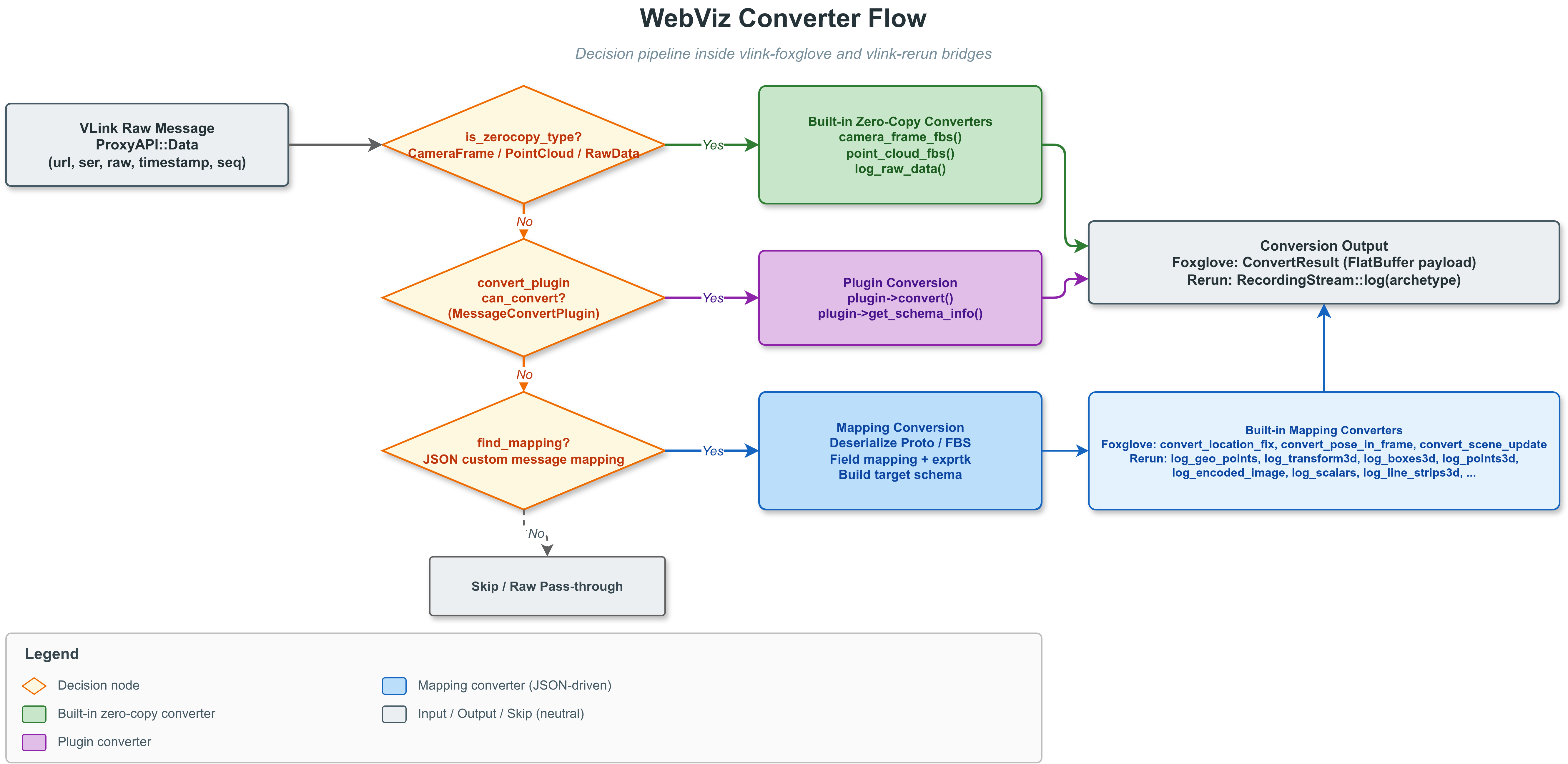
Converter 转换流程
当 WebViz 收到桥接层的 Data 回调时,Converter 按以下优先级尝试转换:
- **零拷贝类型判断**:若 ser 为 vlink::zerocopy::CameraFrame、vlink::zerocopy::PointCloud 或 vlink::zerocopy::RawData,直接调用对应的内置转换函数(如 camera_frame_fbs()),绕过所有其他路径
- **自定义映射匹配**:在已加载的 JSON 映射文件中查找匹配 ser 的 MessageMapping,根据 encoding 字段选择反序列化路径:
- encoding = "protobuf":通过 Schema 插件或 DiskSourceTree 查找 Descriptor,使用 Protobuf 反射 API 反序列化并提取字段
- encoding = "flatbuffers":通过 FBS 目录加载 Schema,使用 FlatBuffers 反射 API 解析并提取字段
- 若映射配置了 timestamp_field,从消息中提取消息级时间戳并覆盖传输侧 wall-clock 兜底时间
- 若为 converter: "send_time"(或插件 SendTime),则按后端语义更新时间流:Foxglove 发送 time update,Rerun 更新 vlink_time duration 时间轴
- **转换插件兜底**:只有在没有命中静态 vlink_msgs 映射时,才会尝试 MessageConvertPlugin::can_convert() / convert();插件可同时通过 extract_timestamp() 提取消息级时间戳
- **裸消息透传**:若无映射但能找到 Proto/FBS Descriptor,直接以原始编码透传给前端
- **无匹配**:跳过该消息(Foxglove 后端返回 success=false,Rerun 后端输出 TextLog 警告)
内置 Foxglove Schema
FoxgloveConverter 内嵌了一组 Foxglove 标准 FlatBuffers Schema(通过 --bfbs-gen-embed 编译时嵌入 BFBS 二进制):
| Schema 名称 | 用途 |
| foxglove.CameraCalibration | 相机标定参数 |
| foxglove.CompressedImage | 压缩图像(JPEG/PNG/H264/H265) |
| foxglove.CompressedVideo | 压缩视频流 |
| foxglove.FrameTransform | 坐标变换(单帧) |
| foxglove.FrameTransforms | 坐标变换(批量) |
| foxglove.GeoJSON | GeoJSON 地理数据 |
| foxglove.Grid | 2D 栅格数据 |
| foxglove.ImageAnnotations | 图像标注叠加 |
| foxglove.JointStates | 关节状态 |
| foxglove.LaserScan | 激光雷达扫描线 |
| foxglove.LocationFix | GPS 定位点 |
| foxglove.LocationFixes | GPS 定位点(批量) |
| foxglove.Log | 文本日志 |
| foxglove.Point3InFrame | 3D 坐标点 |
| foxglove.PointCloud | 3D 点云 |
| foxglove.PoseInFrame | 位姿(位置 + 姿态) |
| foxglove.PosesInFrame | 位姿(批量) |
| foxglove.RawAudio | 原始音频 |
| foxglove.RawImage | 原始图像(未压缩) |
| foxglove.SceneUpdate | 3D 场景更新(障碍物框、线段等) |
| foxglove.VoxelGrid | 体素栅格 |
其中大多数 Schema 提供了基于 field_mappings 的结构化转换;CompressedImage、PointCloud 等零拷贝类型则主要走专门的内置转换路径。
内置 Rerun Archetype
RerunConverter 支持一组常用 Rerun Archetype 的直接映射。Protobuf 输入路径覆盖最完整;FlatBuffers 输入路径已覆盖其中的大多数,但 AnnotationContext、GeoLineStrings、Mesh3D、GraphNodes、GraphEdges 目前仍回退为 TextLog:
| Archetype 名称 | 用途 | 对应的内部方法 |
| GeoPoints | 地理空间点(经纬度) | log_geo_points() |
| Transform3D | 3D 坐标变换 | log_transform3d() |
| Boxes3D | 3D 包围盒 | log_boxes3d() |
| Points3D | 3D 点集 | log_points3d() |
| EncodedImage | 编码图像(JPEG/PNG 等) | log_encoded_image() |
| Image | 原始图像 | log_image() |
| TextLog | 文本日志 | log_text_log() |
| Pinhole | 相机针孔模型(log_static) | log_pinhole() |
| DepthImage | 深度图像 | log_depth_image() |
| Scalars | 标量时序值 | log_scalars() |
| LineStrips3D | 3D 折线段 | log_line_strips3d() |
| LineStrips2D | 2D 折线段 | log_line_strips2d() |
| Boxes2D | 2D 包围盒 | log_boxes2d() |
| Arrows3D | 3D 箭头 | log_arrows3d() |
| Points2D | 2D 点集 | log_points2d() |
| SegmentationImage | 语义分割图像 | log_segmentation_image() |
| SeriesLine | 折线图系列 | log_series_line() |
| SeriesPoint | 散点图系列 | log_series_point() |
| Arrows2D | 2D 箭头 | log_arrows2d() |
| Mesh3D | 3D 网格 | log_mesh3d() |
| Cylinders3D | 3D 圆柱体 | log_cylinders3d() |
| Ellipsoids3D | 3D 椭球体 | log_ellipsoids3d() |
| GeoLineStrings | 地理折线 | log_geo_line_strings() |
| BarChart | 柱状图 | log_bar_chart() |
| AnnotationContext | 标注上下文(log_static) | log_annotation_context() |
| Capsules3D | 3D 胶囊体 | log_capsules3d() |
| EncodedDepthImage | 编码深度图像 | log_encoded_depth_image() |
| Asset3D | 3D 资源文件 | log_asset3d() |
| GraphNodes | 图节点 | log_graph_nodes() |
| GraphEdges | 图边 | log_graph_edges() |
| ViewCoordinates | 视图坐标系(log_static) | log_view_coordinates() |
| InstancePoses3D | 实例位姿 | log_instance_poses3d() |
| AssetVideo | 视频资源 | log_asset_video() |
| VideoFrameReference | 视频帧引用 | log_video_frame_reference() |
| Tensor | 张量 | log_tensor() |
Rerun 后端还支持通过 find_all_mappings() 为同一个 ser 注册多个映射;运行时会按 url 选择器对每个 Archetype / converter 单独选取最具体的一条,因此一条消息仍可同时输出到多个不同 Archetype(如同时生成 Transform3D 和 GeoPoints);Foxglove 则不会这样做。
需要注意:上表描述的是 vlink_msgs 直接映射能力。ConvertPlugin 的 JSON 输出路径复用了其中的大部分 Archetype,但不是全量等价实现;插件 JSON 路径的实际支持范围以上面的 MessageConvertPlugin 章节为准。
零拷贝类型转换
对于 VLink 的零拷贝类型,WebViz 提供内置转换器,无需 JSON 映射:
| VLink 类型 | Foxglove 目标 | Rerun 目标 | 说明 |
| vlink::zerocopy::CameraFrame | foxglove.CompressedImage | EncodedImage / Image | 根据像素格式自动选择压缩/原始图像 |
| vlink::zerocopy::PointCloud | foxglove.PointCloud | Points3D | 自动提取 XYZ 坐标和可选强度/颜色字段 |
| vlink::zerocopy::RawData | foxglove.Log | Asset3D | Foxglove 记录为简要日志,Rerun 记录为 Blob |
CameraFrame 像素格式支持:
| 格式类别 | 格式名称 |
| 未压缩格式 | YUV420, YUV422, YUV444, NV12, NV21, YUYV, YVYU, UYVY, VYUY, BGR888, RGB888 Packed/Planar |
| 压缩格式 | JPEG, H264, H265 |
压缩格式(JPEG/H264/H265)在 Foxglove 中映射为 CompressedImage,在 Rerun 中映射为 EncodedImage;未压缩格式映射为 RawImage / Image。
ProxyBridge 订阅行为差异
两个后端通过统一的 ProxyBridge 工作,但订阅策略仍然不同:
- **Foxglove 后端**:使用 kAuto 策略,整体上按需订阅。普通 channel 只有在前端 subscribe 后才会更新桥接层控制面;但 send_time 内部时间源会常驻订阅。
- **Rerun 后端**:使用 kAutoAndObserveAll 策略,连接后立即订阅系统中所有 URL 的数据。这是因为 Rerun 的 entity 模型不需要预先 advertise channel。
- **proxy_api 模式**:控制面最终会通过 send_control() 发给外部 ProxyServer。
- **proxy_server 模式**:控制面在 WebViz 进程内直接转成本地发现、订阅和发布动作,不再经过外部代理。
插件系统
SchemaPlugin
SchemaPlugin 用于向 WebViz 动态注册 schema,使 Converter 能够解析未在 --proto_dir 中提供的 protobuf 描述或由插件提供的 flatbuffers BFBS。插件以共享库形式加载,通过 SchemaPluginManager 单例管理,实现 SchemaPluginInterface 接口:
class SchemaPluginInterface {
public:
virtual VersionInfo get_version_info() const = 0;
virtual ProtobufDescriptorPtr search_protobuf_descriptor(const std::string& name) = 0;
virtual SchemaData search_schema(const std::string& name) = 0;
virtual ProtobufMessagePtr create_protobuf_message(const std::string& name) = 0;
virtual FlatbuffersSchemaPtr search_flatbuffers_schema(const std::string& name) = 0;
virtual FlatbuffersParserPtr create_flatbuffers_parser(const std::string& name) = 0;
};
插件路径解析顺序:--schema_plugin 命令行参数 > VLINK_SCHEMA_PLUGIN 环境变量。
MessageConvertPlugin
MessageConvertPlugin 用于实现完全自定义的消息转换逻辑,适用于 JSON 映射文件无法表达的复杂场景。插件以共享库形式加载,实现 MessageConvertPlugin 接口:
class MessageConvertPlugin {
public:
enum ConvertTarget { kFoxglove = 0, kRerun = 1 };
virtual bool init(const std::string& config) = 0;
virtual bool can_convert(const std::string& ser, ConvertTarget target) = 0;
virtual bool get_schema_info(const std::string& ser, ConvertTarget target,
std::string& type_name, std::string& encoding,
std::string& schema_encoding, std::string& schema_data) = 0;
virtual bool convert(const std::string& ser, const Bytes& raw,
ConvertTarget target, Bytes& payload) = 0;
virtual int64_t extract_timestamp(const std::string& ser, const Bytes& raw,
ConvertTarget target) { return -1; }
virtual bool can_convert_frontend(const WebChannel& web_channel, ConvertTarget target) { return false; }
virtual bool get_publish_info(const WebChannel& web_channel, ConvertTarget target,
VlinkPublish& publish) { return false; }
virtual bool convert_frontend(const WebChannel& web_channel, const Bytes& raw,
ConvertTarget target, Bytes& payload) { return false; }
};
对于 Rerun 后端(kRerun),插件的 convert() 输出 JSON 格式的 payload,框架内部调用 log_plugin_json() 解析 JSON 并映射到对应 Archetype。
注意:
- Rerun 的插件 JSON 路径不是 vlink_msgs 直接映射能力的完全等价实现,两者支持范围不同。
- 插件 JSON 路径已支持多数几何/标量 archetype,以及 EncodedImage、Image、DepthImage、SegmentationImage、EncodedDepthImage、Asset3D、AssetVideo、Tensor 的二进制输入。
- 上述二进制 archetype 约定通过 data_base64 传输原始字节;Image / DepthImage / SegmentationImage 还需要提供 width / height(或 resolution);Tensor 还需要提供 shape,可选 dim_names。
ConvertPlugin 编写教程
什么时候应该写 ConvertPlugin,而不是继续堆 JSON:
- 需要根据多个字段动态选择输出 schema / archetype
- 需要复杂循环、条件分支、查表、状态机或外部依赖
- 需要前端下发消息回写 VLink,但 foxglove_msgs 难以表达
- 需要把一个源消息拆成多段 payload,或做自定义压缩/封装
推荐的实现结构:
- init() 里解析配置、加载 schema、准备查表数据
- can_convert() 只做快速类型判断,不做重活
- get_schema_info() 返回“这个类型最终对外长什么样”
- convert() 做后端上行转换
- can_convert_frontend() / get_publish_info() / convert_frontend() 做 Foxglove 前端下发链路
下面是一个最小可工作的骨架:
public:
bool init(
const std::string& config)
override {
config_ = config;
return true;
}
bool can_convert(
const std::string& ser, ConvertTarget target)
override {
if (target == ConvertTarget::kFoxglove) {
return ser == "vehicle.proto.VehicleState";
}
if (target == ConvertTarget::kRerun) {
return ser == "vehicle.proto.VehicleState";
}
return false;
}
std::string& type_name, std::string& encoding,
std::string& schema_encoding, std::string& schema_data) override {
if (ser != "vehicle.proto.VehicleState") {
return false;
}
if (target == ConvertTarget::kFoxglove) {
type_name = "foxglove.LocationFix";
encoding = "flatbuffers";
schema_encoding = "flatbuffers";
schema_data = load_embedded_or_file_schema("foxglove.LocationFix");
return !schema_data.empty();
}
if (target == ConvertTarget::kRerun) {
type_name = "GeoPoints";
encoding = "json";
schema_encoding.clear();
schema_data.clear();
return true;
}
return false;
}
bool convert(
const std::string& ser,
const vlink::Bytes& raw,
ConvertTarget target, vlink::Bytes& payload) override {
if (ser != "vehicle.proto.VehicleState") {
return false;
}
auto state = decode_vehicle_state(raw);
if (!state.valid) {
return false;
}
if (target == ConvertTarget::kFoxglove) {
payload = build_foxglove_location_fix(state);
}
if (target == ConvertTarget::kRerun) {
std::string json = R"json({
"latitude": )json" + std::to_string(state.latitude) + R"json(,
"longitude": )json" + std::to_string(state.longitude) + "}";
return true;
}
return false;
}
ConvertTarget target) override {
(void)target;
if (ser != "vehicle.proto.VehicleState") {
return -1;
}
auto state = decode_vehicle_state(raw);
return state.valid ? state.timestamp_ns : -1;
}
return target == ConvertTarget::kFoxglove && channel.
topic ==
"foxglove://cmd/vehicle";
}
vlink::VlinkPublish& publish) override {
return false;
}
publish.
url =
"dds://vehicle/control/cmd";
return true;
}
bool convert_frontend(
const vlink::WebChannel& channel,
const vlink::Bytes& raw,
ConvertTarget target, vlink::Bytes& payload) override {
return false;
}
auto command = decode_frontend_command(channel, raw);
if (!command.valid) {
return false;
}
payload = build_vehicle_cmd(command);
}
private:
std::string config_;
};
bool empty() const noexcept
Returns true if the buffer is empty (no data pointer and size == 0).
Definition bytes.h:880
static Bytes deep_copy(uint8_t *data, size_t size, uint8_t offset=0) noexcept
Creates an owned deep copy of an external mutable buffer.
Abstract interface for VLink/webviz message conversion plugins supporting multiple visualization back...
Definition message_convert_plugin.h:239
virtual bool can_convert(const std::string &vlink_ser, ConvertTarget target)=0
Tests whether this plugin can handle the given VLink serialisation type for the specified target back...
virtual bool convert(const std::string &vlink_ser, const Bytes &raw, ConvertTarget target, Bytes &payload)=0
Converts a raw VLink message to a backend-specific payload.
virtual bool init(const std::string &config)=0
Initialises the plugin with an optional configuration string.
virtual bool get_publish_info(const WebChannel &channel, ConvertTarget target, VlinkPublish &publish_info)
Resolves the destination VLink publish URL and serialisation type for an inbound frontend channel.
Definition message_convert_plugin.h:376
virtual bool get_schema_info(const std::string &vlink_ser, ConvertTarget target, std::string &type_name, std::string &encoding, std::string &schema_encoding, std::string &schema_data)=0
Returns schema/type metadata for the given VLink type and target backend.
virtual int64_t extract_timestamp(const std::string &vlink_ser, const Bytes &raw, ConvertTarget target)
Extracts a message-level timestamp from the raw message, in nanoseconds.
Definition message_convert_plugin.h:345
virtual bool convert_frontend(const WebChannel &channel, const Bytes &raw, ConvertTarget target, Bytes &payload)
Converts a frontend-published payload into a raw VLink message payload.
Definition message_convert_plugin.h:394
virtual bool can_convert_frontend(const WebChannel &channel, ConvertTarget target)
Tests whether this plugin handles a frontend-published channel.
Definition message_convert_plugin.h:360
Plugin interface for VLink/webviz message conversion across visualization backends.
Type-safe dynamic plugin loader with version checking and lifecycle management.
#define VLINK_PLUGIN_DECLARE(ImplementType, VersionMajor, VersionMinor)
Declares a plugin creation and destruction interface.
Definition plugin.h:380
#define VLINK_PLUGIN_REGISTER(InterfaceType)
Macro to register a plugin, automatically deriving its ID from the interface type name.
Definition plugin.h:343
std::string url
Destination VLink URL (e.g. "dds://vehicle/cmd").
Definition message_convert_plugin.h:220
std::string serialization
Destination VLink serialisation type.
Definition message_convert_plugin.h:221
std::string topic
Frontend channel topic as advertised by the client.
Definition message_convert_plugin.h:208
上面的 load_embedded_or_file_schema()、decode_vehicle_state()、build_foxglove_location_fix()、 decode_frontend_command()、build_vehicle_cmd() 都是示意性辅助函数,实际项目里通常分别对应:
- 读取 BFBS / Protobuf schema
- 反序列化原始 VLink 消息
- 构造 Foxglove 输出 payload
- 解析 Foxglove 前端输入 payload
- 构造要发往 VLink 的 payload
实现时有几个硬约束:
- 插件接口版本当前是 4.0,VLINK_PLUGIN_DECLARE(..., 4, 0) 必须一致
- convert() 和 convert_frontend() 可能并发调用,插件必须线程安全
- Foxglove 目标需要返回最终 payload 编码对应的真实二进制
- Rerun 目标需要返回 UTF-8 JSON 字符串,而不是 protobuf/flatbuffers 二进制
- 如果你的插件接管前端下发,但又没有配置 foxglove_msgs,需要显式开启 capabilities.publish
建议的调试方法:
- 先只实现 can_convert() + get_schema_info(),确认前端能看到通道
- 再实现 convert(),先生成最小 payload
- 最后再补 extract_timestamp() 和前端下发链路
- 如果 Rerun 插件 JSON 不生效,先把 payload 打印出来,再对照 log_plugin_json() 支持字段排查
Foxglove WebSocket 协议细节
vlink-foxglove 实现了 Foxglove WebSocket Protocol v1(子协议标识:foxglove.websocket.v1)。
协议字段里的 FlatBuffers 编码名必须使用官方单数形式 flatbuffer。webviz 本地 JSON 配置仍兼容 flatbuffers / flatbuffer 两种写法,但对外 advertise 给 Foxglove 前端时会统一收敛为 flatbuffer,避免前端报 Unsupported message encoding flatbuffers。
服务端发送的二进制帧
| Opcode | 名称 | 载荷格式 |
| 0x01 | MessageData | subscription_id(4B) + timestamp_ns(8B) + payload |
| 0x02 | Time | timestamp_ns(8B) |
| 0x03 | ServiceCallResponse | service_id(4B) + call_id(4B) + enc_len(4B) + encoding + payload |
| 0x04 | FetchAssetResponse | request_id(4B) + status(1B) + err_len(4B) + error_msg + data |
支持的 JSON 操作
| 操作 | 方向 | 说明 |
| serverInfo | Server -> Client | 连接后发送服务端信息 |
| advertise | Server -> Client | 通告可用通道列表 |
| advertiseServices | Server -> Client | 通告可用服务列表 |
| status | Server -> Client | 发送全局或会话级状态消息 |
| removeStatus | Server -> Client | 移除全局状态消息;用于清除已恢复的桥接错误或断连提示 |
| unadvertise | Server -> Client | 移除通道 |
| connectionGraphUpdate | Server -> Client | 连接图更新;按 topic/service 聚合 publisherIds / subscriberIds / providerIds |
| serviceCallFailure | Server -> Client | 服务调用失败原因 |
| parameterValues | Server -> Client | 返回参数值或推送参数更新;内容来自本地 parameters.values 状态;已删除/不存在的参数不会作为空条目返回 |
| subscribe | Client -> Server | 订阅通道 |
| unsubscribe | Client -> Server | 取消订阅 |
| advertise (client) | Client -> Server | 客户端发布通道声明 |
| unadvertise (client) | Client -> Server | 客户端取消发布 |
| callService | Client -> Server | 发起服务调用 |
| getParameters | Client -> Server | 获取指定参数当前值 |
| setParameters | Client -> Server | 设置参数并回写到后端参数 URL |
| subscribeParameterUpdates | Client -> Server | 订阅参数更新 |
| unsubscribeParameterUpdates | Client -> Server | 取消参数更新订阅 |
| subscribeConnectionGraph | Client -> Server | 订阅连接图 |
| unsubscribeConnectionGraph | Client -> Server | 取消连接图订阅 |
| fetchAsset | Client -> Server | 请求资源文件 |
Capabilities 能力声明
服务端在 serverInfo 中声明支持的能力,均可通过配置文件开关控制:
| 能力 | 说明 |
| time | 推送时间更新;时间值可来自 send_time 内部时间源,或退化为 proxy 侧 wall-clock 兜底 |
| services | 支持 Service Call;能力开关为 capabilities.rpcs,RPC 映射文件列表为 rpc_msgs |
| parameters | 支持参数读写;由 parameters.values 或 parameters.url 启用,当前端修改参数时可选通过 parameters.url 下发到后端;若仅配置 parameters.url,面板初始为空 |
| parametersSubscribe | 支持参数增量订阅;空 parameterNames 表示全部参数;后续订阅请求会替换该客户端之前的参数订阅集合;若在“全部参数”状态下执行 unsubscribeParameterUpdates(names),则表示排除这些参数而不是冻结当前参数全集 |
| connectionGraph | 支持节点连接图拓扑 |
| clientPublish | 允许客户端向 VLink 系统发布数据(需 Controller 角色) |
| assets | 支持从配置目录获取资源文件(需配置 asset_dirs) |
当前 webviz/foxglove 已实现 parameters / parametersSubscribe;playbackControl 等更高层能力仍未实现,因此 Foxglove 前端里依赖这些未实现能力的面板不应强行映射到 rpc_msgs / foxglove_msgs。
Foxglove 与 Rerun 的选择
| 维度 | Foxglove Studio | Rerun Viewer |
| 平台 | Foxglove Studio(浏览器或桌面) | Rerun Viewer |
| 协议 | WebSocket | gRPC |
| Schema 格式 | Foxglove FlatBuffer Schema | Rerun Archetype |
| 3D 渲染 | 3D 场景面板(SceneUpdate) | 原生 3D 空间视图 |
| 图像 | 图像面板 + 标注叠加 | 图像 + 分割 + 深度 |
| 地理空间 | 地图面板(LocationFix) | GeoPoints + 地图 |
| 时序图表 | Plot 面板 | Scalars / SeriesLine |
| 离线文件 | MCAP | RRD |
| 部署便利性 | 连接现有 WebSocket 前端即可 | 通常需配合 Rerun Viewer,或直接导出 RRD |
| 适用场景 | 远程调试、团队协作、CI 集成 | 本机开发、高性能 3D、多模态融合 |
两个后端可以同时运行,用户可根据场景选择最适合的前端。

 1.16.1